How To Create Sub Domains Or Co-Domains In Ispconfig Web Hosting Panel
This Page Contains information about How To Create Sub Domains Or Co-Domains In Ispconfig Web Hosting Panel By bigger_travis in category Linux Systems with 7 Replies. [2878], Last Updated: Tue Feb 07, 2023
bigger_travis
Tue Jan 16, 2007
7 Comments
8979 Visits
I am posting this message here because recently i had to contact www.webune.com because the dedicated server i have with them, i installed ispconfig to play with it, but i couldn't figure out how to create sub-domains or as ispconfig calls it, co-domains. I had asked this question from webune before but i forgot how to do it, so they were kind to guide me again, so this time i am making a small tutorial to benefit other people like me who are trying to figure out how exactly to create subdomains in ispconfig. so here we go... to give you a real life example, lets say i want to create a subdomain like this: test.wallpaperama.com
1. login to your control panel and select the website you want.
2. go to the co-domains tab
3. click on the "new" button
4. enter the hostname (this is whatever you want, in my example i will be using test)
5. next enter the domain name (in my example would be wallpaperama.com)
6. now select the option create DNS
7. for the MX option, i don't know what exactly this is for, but i am sure it has to do something to do with email, i don't select it)
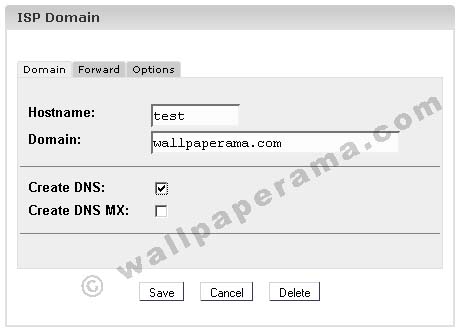
9. now go to the "forward" tab, and enter a directory name. (for my example i will call it wallpaperama.com) you dont have to forward, but if you don't put anything here, then when you go to test.wallpaperama.com all the traffic will go to your web site root directory, so that's why i am putting wallpaperama in my example
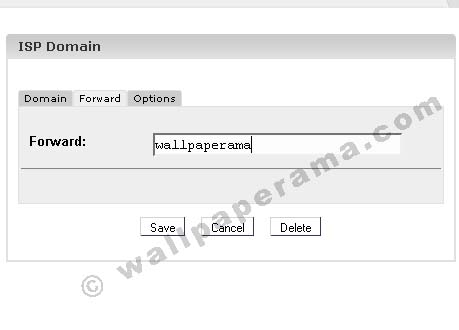
10. now hit the save button
11. its time to create a directory in your web directory, so for the purpose of this tutorial, i will be creating a directory called "wallpaperama". connect to your site with your FTP program and create a directory.
12. now upload whatever files you want to show in test.wallpaperama.com to test that it really work, upload an index file like: index.html
thats it.
Thanks to the expert at www.webune.com for their technical support on this issue. now if i forget how to do this in the future, at least i can come back to this post and find out how to do it.
1. login to your control panel and select the website you want.
2. go to the co-domains tab
3. click on the "new" button
4. enter the hostname (this is whatever you want, in my example i will be using test)
5. next enter the domain name (in my example would be wallpaperama.com)
6. now select the option create DNS
7. for the MX option, i don't know what exactly this is for, but i am sure it has to do something to do with email, i don't select it)
9. now go to the "forward" tab, and enter a directory name. (for my example i will call it wallpaperama.com) you dont have to forward, but if you don't put anything here, then when you go to test.wallpaperama.com all the traffic will go to your web site root directory, so that's why i am putting wallpaperama in my example
10. now hit the save button
11. its time to create a directory in your web directory, so for the purpose of this tutorial, i will be creating a directory called "wallpaperama". connect to your site with your FTP program and create a directory.
12. now upload whatever files you want to show in test.wallpaperama.com to test that it really work, upload an index file like: index.html
thats it.
Thanks to the expert at www.webune.com for their technical support on this issue. now if i forget how to do this in the future, at least i can come back to this post and find out how to do it.
boubyopybu
Mon Jul 20, 2009
vaibhav
Sun Jul 12, 2009
hello
i want to learn about ispconfig so please send me some .pdf or some tutorial
i want to learn about ispconfig so please send me some .pdf or some tutorial
matias
Mon Jul 06, 2009
i followed the steps mentioned and i am getting a "shared ip" error message when i visit the subdomain.
what could have gone wrong?
what could have gone wrong?
gluki
Tue Mar 18, 2008
nonsense!!!
sub-domain (sub.example ) must be managed in currently managed domain (example )
question is - possible or not in ispconfig???
https://www.wallpaperama.com/forums/how-to-create-sub-domains-or-co-domains-in-ispconfig-web-hosting-panel-t721.html
sub-domain (sub.example ) must be managed in currently managed domain (example )
question is - possible or not in ispconfig???
https://www.wallpaperama.com/forums/how-to-create-sub-domains-or-co-domains-in-ispconfig-web-hosting-panel-t721.html
Ben
Fri Feb 15, 2008
there is a way, it takes a different approach though. you have to create a new site with the subdomain instead of an "co-domain."
say you have "example "
instead of creating a co-domain titled "sub.example ", you must create an entirely new site at "sub.example "
hope that helps any people that find this page via search engine.
say you have "example "
instead of creating a co-domain titled "sub.example ", you must create an entirely new site at "sub.example "
hope that helps any people that find this page via search engine.
Related Content
- Ispconfig Automatic Create User Account With Front-end Billing System
- Ispconfig Hosting Panel: FTP Problem User Cannot Connect
- Cant Login To Ftp After Ispconfig Installation Ftp 530 Error
- Linux Shell Command On How To Restart Ispconfig?
- How To Integrate Paypal Into Ispconfig Web Hosting Control Panel
- How To Install Remoting Framework In Ispconfig Version 3
- How To Move Ispconfig From Old Server To New Server
- FTP: ISPConfig Message Maximum Disk Storage
- ISPconfig Billing System Automatic Payments Front End Script Code Plugin Function
- Invalid Or Corrupted Error Code 8182 In Firefox On Ispconfig Hosting Panel
ben... your absolutely right!! :)