How To Fix Errors That Says Bad Parameter Adobe Acrobat Pro.
this page will show you exactly what to do to fix a problem with adobe acrobat from when you want to create a new file from scanner [8645], Last Updated: Sat May 18, 2024
savis
Wed Dec 31, 1969
3 Comments
4718 Visits
why are you getting this error?
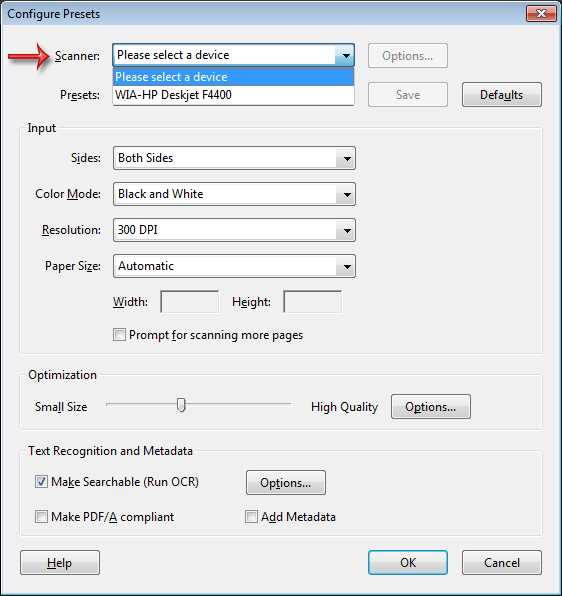
answer: because you need to select a the default scanner. to do this simply go to :
file > Create PDF > From Scanner > Configure Presets
a new window will open, the first field is scanner, it will say: please select a device. just select you scanner connected to your computer
answer: because you need to select a the default scanner. to do this simply go to :
file > Create PDF > From Scanner > Configure Presets
a new window will open, the first field is scanner, it will say: please select a device. just select you scanner connected to your computer
sam
Fri Mar 08, 2013
sam
thanks, that solution worked for me,i dont have that problem anymore
Kevin
Fri Mar 08, 2013
What if you don't have a scanner? The following solution worked for me: 1) use the Combine Files feature to combine the problem PDF with another PDF (I suggest using a small PDF that has no issues). 2) After combining, save the results. 3) Open the saved file and delete the pages added in the prior step. 4) Save the results. The issue should be fixed.
Deanna
Thu Feb 12, 2015
Thank you for the life preserver. Acrobat should fix its own BUGS, plural, but thanks to you, I can at least get around this one.
james
Thu Jul 19, 2012
i cant believe i still us acrobat, there is not alternative for it?