[SOLVED] Norton Internet Security Sonar Protection Not Fixed
This is an error i am getting on my Norton Internet Security suit software that says 'Norton Internet Security Sonar Protection Not Fixed' when i click on the fix button on the Norton anti-virus software installed in your microsoft windows computer [2637], Last Updated: Sat May 18, 2024
warren
Wed Dec 23, 2009
70 Comments
40896 Visits
I have Norton internet security installed in my windows computer. Today when I rebooted my computer my panel had an error message.
This is an error I am getting on my Norton Internet Security when i click on the fix button.
For some reason, when i try to fix it says:
I don't know what to do to resolve this problem I don't understand the message.
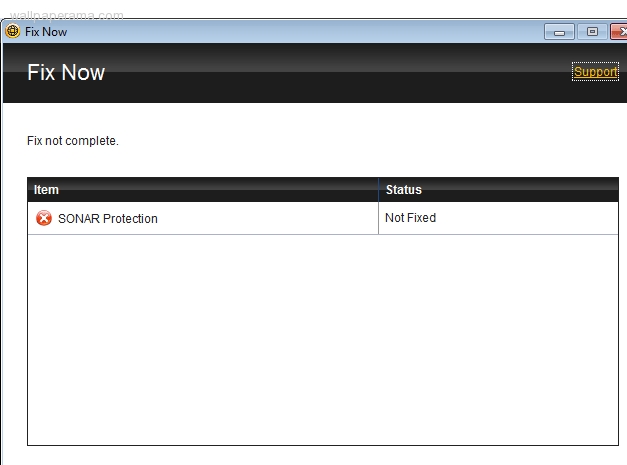
Here is a snapshot of the windows that pops up
UPDATE: Thanks Tom! Tom's reply was the best solution. You can find tom's answer in the comments below, you'll know is tom's reply because you will see a bunch of thumbs up!!! if not, look for the most liked comments, that the solution that worked best.
This is an error I am getting on my Norton Internet Security when i click on the fix button.
For some reason, when i try to fix it says:
FIX NOW
Fix not complete
Item: SONAR protection
Status: not fixed
Support
Fix not complete
Item: SONAR protection
Status: not fixed
Support
I don't know what to do to resolve this problem I don't understand the message.
Here is a snapshot of the windows that pops up

UPDATE: Thanks Tom! Tom's reply was the best solution. You can find tom's answer in the comments below, you'll know is tom's reply because you will see a bunch of thumbs up!!! if not, look for the most liked comments, that the solution that worked best.
tom
Sun Jun 10, 2012
Fredrick
Fri May 20, 2011

sonar protection has a bug on Vista computer. I push the button to fix, nothing happens.
Please help!
Thanks.
marlon
Mon Jan 20, 2014
you need to update to windows 7 or 8, vista is not a good operating system, whoever still has vista, get rid of it, its the best advise you are going to get
Henry
Mon Jan 20, 2014
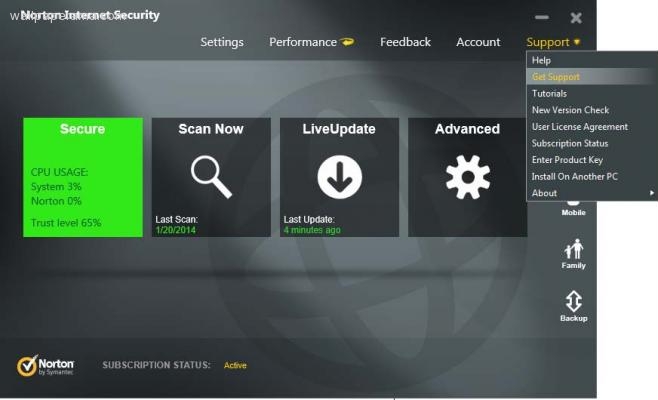
its very easy to fix, just click on the support link and it will start to look for any errors in the installation. very easy.
note if you are getting this error, you just need to update your norton to a new version
note if you are getting this error, you just need to update your norton to a new version
philip
Mon Nov 08, 2010

plz take care of this problem it's a pain in my #$%.(sonar protection)
https://www.wallpaperama.com/forums/norton-internet-security-sonar-protection-not-fixed-t7594.html
https://www.wallpaperama.com/forums/norton-internet-security-sonar-protection-not-fixed-t7594.html
kevv
Mon Feb 18, 2013

sometimes the only way to fix this is to go to support, i dont know why they have not fixed this. but thanks to these comments, i was able to solve my problem
Then Left Click "Get Support"
Then Left Click "Begin Support Session"
It will start a scan of your system. Mine had an issue with the Sonar definitions. It asked to reboot to confirm, and upon reboot everything was fixed and running properly.