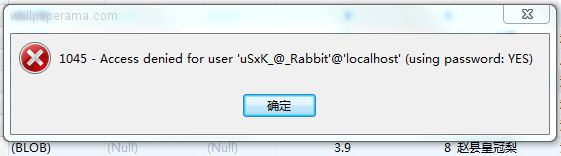
Got error: 1045: Access denied for user 'user'@'localhost' (using password: YES) when trying to connect to database
Forums »
MySQL Forums And Topics Discussions About Open Source Database »
Access denied for user 'user'@'localhost' (using password: YES) when trying
MySQL Forums And Topics Discussions About Open Source Database »
Access denied for user 'user'@'localhost' (using password: YES) when trying
Description: Access denied for user 'user'@'localhost' (using password: YES) when trying
Tags: access ,denied ,for ,user ,user ,localhost ,using ,password ,yes ,when ,trying
Posted On Sun Dec 03, 2006 By bigger_travis In MySQL Forums And Topics Discussions About Open Source Database Forums
Got error: 1045: Access denied for user 'user'@'localhost' (using password: YES) when trying to connect to database

mysqld Thu Jan 19, 2012
From putty, you can use the below command to resolve the issue.
[root - at - h vi /var/www/html/c that,you have to change the password as which you gave in mysql password
It will resolve the issue.
Thanks
[root - at - h vi /var/www/html/c that,you have to change the password as which you gave in mysql password
It will resolve the issue.
Thanks
sumedha Wed Aug 24, 2011
error n0. 1045
access denied to mySQL - at - localhost(using password:NO)
...
help me out..
btw whch password do i have to use??i dnt have any user acc pwd..
access denied to mySQL - at - localhost(using password:NO)
...
help me out..
btw whch password do i have to use??i dnt have any user acc pwd..
adwda Wed Jul 27, 2011
I was scared after doing this that even after changing the config file phpmyadmin would still give me a error. If that’s the problem, close your browser, open a fresh one and type it again, a login screen for phpmyadmin will show up and you can type root as the username and password as the password, thanks!
valentin Fri May 27, 2011
I had the same problem.
I reset the user password to another one and then, again to the correct one. That's resolved for me !
Halo-Halo.Biz Wed Nov 24, 2010
If you have access to your cPanel, 1)go and click your Database creation icon, 2)Add a new user and new password 3)Add User to database(old db) with "All Privileges" in so doing you're trying to link back to the same database with password that didn't work, this time with a New User and password.
krunal Wed Jun 30, 2010
mere pc me f drive ke folder open nahi ho rahe he,open karu to access denied likha aa jata he,pleaz help meeeeeeeee FRIEND
Jet Thu Apr 22, 2010
Use username as "Root" and password as "password you set for while installing mySql" and things should work.
if you forgotton the password use "mysqladmin -u root password ANy_PASSWORD" to reset the password.
Ron Wed Apr 07, 2010
I am having the same problem. I am dead new to MySQL. I can get into the command line client because I guessed my password but I do not know what my user ID is. Since I can create databases I am a root user. I have 10 yrs with Oracle but that does not help me here. I am using MySQL 5.1. I am actually trying to log in with Toad so I can manage the database with a GUI. I am hoping I am not getting the user ID correct. I don't know what table contains the user info.
wallpaperama Sun Feb 21, 2010
if you are the root or administrator of the server all you have to do is send this command to set the root password:
NOTE: WHATEVER_PASSWORD is whatever password you want to set for you sql
mysqladmin -u root password WHATEVER_PASSWORD
NOTE: WHATEVER_PASSWORD is whatever password you want to set for you sql
Kirby Fri Dec 07, 2012
where do i have to paste that?
Cxxxxx Sun Feb 21, 2010
That's great and all, I'm glad someone could read between the lines of code, but as for us newbies...can we get a step-by-step on how to update the password in the database?
Vatisho Sat Aug 08, 2009
i love you "mysql helper"
that really worked (the default name "localhost") it was so simple but i didn't know it, thanx again! marry me xd lol
thanx a lot
that really worked (the default name "localhost") it was so simple but i didn't know it, thanx again! marry me xd lol
thanx a lot
shoo Sun Feb 08, 2009
$link = mysql_connect('localhost', 'datebase_user', 'datebaseuserpassword');
if (!$link) {
die('could not connect: ' . mysql_error());
}
echo 'connected successfully';
mysql_close($lin
$link = mysql_connect('localhost', 'datebase_user', 'datebaseuserpassword');
if (!$link) {
die('could not connect: ' . mysql_error());
}
echo 'connected successfully';
mysql_close($lin
Anand Mon Jan 19, 2009
there was a problem connecting to the database server. the following error had occured:
access denied for user 'anand' at 'localhost' (using password: yes)
please verify the connection parameters and try again.
access denied for user 'anand' at 'localhost' (using password: yes)
please verify the connection parameters and try again.
sasiowen Sun Oct 12, 2008
connect failed: access denied for user 'weberp_db_user' at 'localhost' (using password: yes)
can someone teach me how to solve this problem.....
plz tell me step by step.....help help help.....urgent....thank you...
can someone teach me how to solve this problem.....
plz tell me step by step.....help help help.....urgent....thank you...
wallpaperama Sun Oct 12, 2008
it just means your username or password is incorrect, try login in with phpmyadmin to test it out
sasiowen Sun Oct 12, 2008
hi, can you help me, i need to know why i keep getting this error?
got error: 1045: access denied for user 'user' at 'localhost' (using password: yes) when trying to connect to database
Alex Sat Sep 20, 2008
is the sql server on your local machine, or on a server on the internet? are you using a class file, or are you just scripting everything by hand?
mysql Fri Dec 15, 2006
you are getting this error because your script cannot connect to your database with the information you have provided.
Access denied for user 'user'@'localhost' (using password: YES) when trying to connect to database
Make sure you have the correct username and password, if you are sure you have the correct login and pasword, then you need to check with your administrator because you defenetly have either the wrong login or password and that's why your script cannot connect to your mysql database.
check these four things to make sure you have them right:
1. your hostname (usually is "localhost")
2. your database username (not your hosting username, BUT your mysql)
3. Your database password
4. Your database name
if you still cannot login, contact www.webune.com to reset your password.
Access denied for user 'user'@'localhost' (using password: YES) when trying to connect to database
Make sure you have the correct username and password, if you are sure you have the correct login and pasword, then you need to check with your administrator because you defenetly have either the wrong login or password and that's why your script cannot connect to your mysql database.
check these four things to make sure you have them right:
1. your hostname (usually is "localhost")
2. your database username (not your hosting username, BUT your mysql)
3. Your database password
4. Your database name
if you still cannot login, contact www.webune.com to reset your password.
Ian Thu Jun 14, 2012
Just suffered from this on optware/tomatousb - apparently for this enivornment (and maybe in general?) the default or administrator mysql username is Root, but unless you use -u option with mysqladmin it uses the current logged in user, i.e. root, and so it doesn't work...
Solution: command is
mysqladmin -u root status
which works. Hurray.
Solution: command is
mysqladmin -u root status
which works. Hurray.
Tushar Tue Oct 09, 2012
I was scared after doing this that even after changing the config file phpmyadmin would still give me a error. If that’s the problem, close your browser, open a fresh one and type it again, a login screen for phpmyadmin will show up and you can type root as the username and password as the password, thanks!
M.Sulaiman Wed Oct 31, 2012
i also having this problem but i have solved,u must give in the start insatallation user is "root" & dnt give any password,koz by default no password,im sure you will have found no error
Information
Title: Access denied for user 'user'@'localhost' (using password: YES) when trying
Info: This Post Has Been Viewed 0 Times Since
Date: Sun Dec 03, 2006
Author bigger_travis Received 23 Replies #862
Date: Sun Dec 03, 2006
Author bigger_travis Received 23 Replies #862
Related Content
Related Sites
Add Your Website
Share
URL: 

Embed: 

To embed this topic, just copy the code from the "Embed" box. Once you've copied the code, just paste it into your website or blog to embed it
BBCODE:: 

BBCODE is use on forums. You can put this code on all your BBCODE enabled forums like PhpBB, vBulletin® and others. Just Copy and Paste this code on your Posts and Replies on your forums
wallpaperama | Wallpapers | Forums | Terms Of Service
copyright © 2013 wallpaperama - All Rights Reserved - Last Updated Wed Jun 19, 2013 (-8 GMT)
Powered by: Webune Forums V5
copyright © 2013 wallpaperama - All Rights Reserved - Last Updated Wed Jun 19, 2013 (-8 GMT)
Powered by: Webune Forums V5

