Securyt Informatin
This page contains both secure and nonsecure items:
Do you want to display the nonsecure items?
Yes No More Info
What can I do to get rid of this popup in my computer.
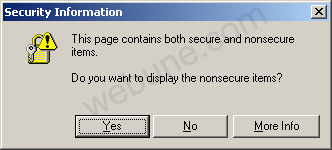
Windows Disable: This Page Contains Both Secure And Nonsecure ItemsWindows Disable: This Page Contains Both Secure And Nonsecure Items Windows Disable: This Page Contains Both Secure And Nonsecure Items
Post Description: Post Tags: windows, disable, this, page, contains, both, secure, and, nonsecure, items This Post Has Been Viewed 42189 Times Since Fri Aug 04, 2006 5:36 pm Posted By pinguin with 12 replies
Sometimes when I visit some secured websites with https urls I keep getting this anoying popup window in Internet Explorer prompting me:
Securyt Informatin This page contains both secure and nonsecure items: Do you want to display the nonsecure items? Yes No More Info What can I do to get rid of this popup in my computer. Leave Your Comments [ dejar commentarios ] Comments and replies About Windows Disable: This Page Contains Both Secure And Nonsecure Items :: 1 :: #73 - Reply By pinguin On Fri Aug 04, 2006 6:04 pm
I will show you how to get rid of this annoying popup window whenever you are visiting secured sites. Follow these steps that have been provided by Webune Support:
If you are a webmaster or have a website and your visitors are complaining to you about this error, visit this post by CLICKING HERE. If you are a user, and what to get rid of the popup in your computer browser follow these instructions: Step 1: Go to Tool >> Internet Options
Step 2: Select the "Security" Tab and then click on the "Custome Level" button
Step 3: Scroll down until you see the option: "Display mixed content". Sect the option "Enable"
Step 4: Click Ok, Then you will get a "Security Warning" pop-up. Click Yes
Step 5. Click Ok also on the "Interner Options" windown that's on your screen. DONE: Now whenever you visit a secured wep page, you will not get the popup you were getting before. Step by Step Tutorial Guide Provided by: Webune Support http://www.webune.com . :: 2 :: #74 - Reply By pinguin On Wed Nov 08, 2006 8:05 pm
Solution: Fix for secure and nonsecure items warning message
I run a secure phpBB forum that ONLY operates on port 443, SSL is required or the connection is denied. My users started requesting the ability to post youtube and google videos within the post. I installed the [2.0.19] Youtube Video BBCode and the [2.0.21] Google Video and everthing worked perfectly, until I tested the feature in my browser and got the following warning message: Quote: This page contains both secure and nonsecure items.
Do you want to display the nonsecure items? AHH! How annoying. So I went about looking for a workaround for this and finally came up with my own solution, that is very easy. Open includes\bbcode.php Find Code: // [email]user@domain.tld[/email] code..
$patterns[] = "#\[email\]([a-z0-9&\-_.]+?@[\w\-]+\.([\w\-\.]+\.)?[\w]+)\[/email\]#si"; $replacements[] = $bbcode_tpl['email']; After Add Code: // [youtube]YouTube URL[/youtube] code..
$patterns[] = "#\[youtube\]http://(?:www\.)?youtube.com/watch\?v=([0-9A-Za-z-_]{11})[^[]*\[/youtube\]#is"; $replacements[] = $bbcode_tpl['youtube']; // [GVideo]GVideo URL[/GVideo] code.. $patterns[] = "#\[GVideo\]http://video.google.com/googleplayer\.swf\?docid=([0-9A-Za-z-_]*)[^[]*\[/GVideo\]#is"; $replacements[] = $bbcode_tpl['GVideo']; // [GVideo]GVideo URL[/GVideo] code.. $patterns[] = "#\[GVideo\]http://video.google.com/videoplay\?docid=([0-9A-Za-z-_]*)[^[]*\[/GVideo\]#is"; $replacements[] = $bbcode_tpl['GVideo']; Find Code: $text = preg_replace($patterns, $replacements, $text);
After Add Code: $text = str_replace("http://www.youtube.com/", "https://example.com/lounge/youtube/", $text);
$text = str_replace("http://video.google.com/videoplay", "https://example.com/lounge/googleplayer.swf", $text); $text = str_replace("http://video.google.com/", "https://example.com/lounge/", $text); Now heres the cool part, in your sites root web-accessible folder http://www.example.com/ add an .htaccess file with the following: Code: RewriteEngine On
RewriteBase / RewriteRule ^lounge/googleplayer\.swf(.*)$ http://video.google.com/googleplayer.swf$1 [L] RewriteRule ^lounge/youtube/(.*)$ http://www.youtube.com/$1 [L] and it worked! http://www.htaccesselite.com/htaccess/fix-for-secure-and-nonsecure-items-vt128.html :: 3 :: #75 - Reply By pinguin On Wed Nov 15, 2006 12:58 am
Thanks for this info. i need some clarifications on this.
In the below url, you have mentioned 'I basically did a str_replace on all posts text for http://video.google.com and http://youtube.com to change them to https://www.example.com/htaccess/ '. Could you elaborate on this. Why do you change it to example.com etc... Thanks. http://www.htaccesselite.com/htaccess/fix-for-secure-and-nonsecure-items-vt128.html :: 4 :: #76 - Reply By pinguin On Wed Dec 13, 2006 7:38 am
Changing the "Display Mixed Content" setting in IE 7 did not work for me. Regardless of what I set it to, I still see the message "This page contains both secure and non-secure items".
So what can I do to get IE not to show me this message?? :: 5 :: #77 - Reply By pinguin On Wed Jan 17, 2007 6:35 pm
[quote:1fa56dc810="sweetyt"]Thanks for this info. i need some clarifications on this.
In the below url, you have mentioned 'I basically did a str_replace on all posts text for http ://video.google.com and http ://youtube.com to change them to https ://www.example.com/htaccess/ '. Could you elaborate on this. Why do you change it to example.com etc... Thanks. http ://www.htaccesselite.com/htaccess/fix-for-secure-and-nonsecure-items-vt128.html Example.com is supposed to represent the url that the phpBB forum is hosted from. I didn't want to reveal the url of the site I was talking about. This is elaborated on in much more detail at http://www.askapache.com/2006/htaccess/mixed-ssl-content-warning-secure-fixed.html Mixed SSL Content Warning Secure Fixed - AskApache :: 6 :: #254 - Reply By brastic On Thu Feb 08, 2007 3:21 am
congratulations, this is an execellent tutorial guide on showing how can i get rid of the this page contains both secure and nonsecure items warning :: 7 :: #3847 - Reply By vicky On Sat May 19, 2007 1:51 am
hellohellohellohellohellohellohellohellohellohellohellohellohellohellohellohellohellohellohellohellohellohellohellohellohellohellohellohellohellohellohello :: 8 :: #15974 - Reply By Prasad On Thu Aug 16, 2007 10:48 am
this is good solution for disable security information and it is useful for https urls.
thanks prasad kr :: 9 :: #19891 - Reply By botgurl On Wed Sep 12, 2007 12:06 pm
ms attributes this problem to iframe tags with no valid src attribute. worked when i referenced a blank html in iframe tags
support.microsoft /default.aspx?scid=kb;en-us;261188 :: 10 :: #20108 - Reply By eric chavkin On Fri Sep 14, 2007 8:02 am
exactly what i was looking for . thanks :: 11 :: #29924 - Reply By Stella On Fri Nov 30, 2007 8:00 pm
i have been reserching the past 3 month how to get rid of this anoying pop up and thanks to your tutorial i finally got rid of...thank you very much :: 12 :: #45994 - Reply By Mahatab On Tue Mar 18, 2008 7:51 am
thanks, my problem solved. i have successfully removed this security warning by placing src attribute value |