Password Protect Your Website Directories Folders Apache Htpasswd Htaccess

Mobile
feeds
Welcome Login | Register

Password Protect Your Website Directories Folders Apache Htpasswd Htaccess
  Forums Index
      » Linux Hosting Forums
        » » Password Protect Your Website Directories Folders Apache htpasswd htaccess


Password Protect Your Website Directories Folders Apache Htpasswd Htaccess
Post Description:
Post Tags: password, protect, your, website, directories, folders, apache, htpasswd, htaccess, linux hosting, troubleshoot, help, support advise, questions, answers
This Post Has Been Viewed 935 Times Since Tue Apr 03, 2007 7:57 am Posted By pinguin with 0 replies
Password Protect Your Website Directories Folders Apache Htpasswd Htaccess
post picture

f you are like many admin, its important to protect some directories (folders) from public view. to do this, apache offers htpasswd htaccess. With these two files, you can secured your files from public view. for example, if you have some part of your site that you only want registered members to be able to access, you can use apache's htpasswd htaccess.

Today i will show you how you can do this with two simple files. All you need to create these files, is a simple text editor. If you have windows, you can use notepad. I will use notepad for this demonstration (tutorial guide steps)

the first step to proctect your files in a particular directory, or folder as some windows folks call them, you can will need to create two files, and they are htpasswd htaccess

so here we go, first i am going to create a file called .htpasswd (yes, that's a period at the beginning of htpasswd ) open a blank notepad and copy and save the following:


     Code:
admin:rpgb/IvLX3GTI


now save this as ".htpasswd" (include the quotes when saving with notepad)


the second file will be called .htaccess copy and save this to a blank notepad:

     Code:
AuthType Basic
AuthName "Members Only"
AuthUserFile /your/directory/protected/.htpasswd
<limit GET PUT POST>
require valid-user
</limit>

NOTE: Change "/your/directory/" to whatever you absolute path is to the directory where you are going to upload these two files
now save this file as ".htaccess" (include the quotes if you are using notepad)

you can create a third file, this will be called index.html, so once you have successfully logged in, you'll be able to confirm that you are infact logged into the protected directory. so you can copy and paste this HTML file called index.html


     Code:
<!DOCTYPE HTML PUBLIC "-//W3C//DTD HTML 4.01 Transitional//EN" "http://www.w3.org/TR/html4/loose.dtd">
<html>
<head>
<meta http-equiv="Content-Type" content="text/html; charset=utf-8">
<title>Protected Directory</title>
</head>

<body>
<div align="center">
This Tutorial Sponsored by <a href="http://www.webune.com">Webune Web Hosting</a>
<table border="1" cellspacing="5" cellpadding="10">
<tr>
<td align="center"><a href="http://www.webune.com"><img src="http://www.wallpaperama.com/images/affiliates/webune-hosting.jpg" border="0"></a></td>
</tr>
</table>
<h1>CONGRATULATIONS!!!
</h1>
<hr>
<h4>Welcome to Wallpaperama! </h4>
<p align="left"><em>Notice: This is a password protected directory</em></p>
<p align="left">&nbsp;</p>
<p align="center"><img src="http://webune.com/images/logo4.jpg"></p>
<p align="center">PHP MYSQL Web Hosting Provided By <a href="http://www.webune.com">Webune.com</a></p>
</div>
</body>
</html>


save this HTML file as index.html

Now ftp to your website and create a new directory called "protected" and upload these three files you just created: index.html , .htaccess and .htpasswd

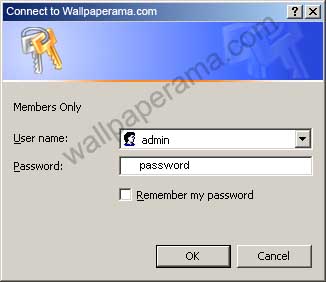
after you have uploaded all three files into the "proctected" directory, open the index.html file with your browser and you will get a login popup asking for your login and password:

login with these:

username: admin
password: password

now, to show you that this really works, you can see test if for yourself.

go to http://www.wallpaperama.com/tutorials/protected
and login using admin/password as your username and pasword.
post picture


     Quote:
apache redirect password file apache password protect options passwd manager password protect crack create file mac on windows apache tomcat password protect include_path redirect 301 crypt apache php apache server apache axis users htpass tvs apache htpasswd forbidden apache windows apache 2 apache commons fichiers apache ssl register_globals in archivos download apache redirect 404 dreamhost apache web server apache ant password protect file folders spip apache struts ホスト php mysql limit get post net password protect redirectpermanent apache helicopter wallpaperama.com apache php mysql you don t have permission to access problème 設定方法 password protect folder os x apache mysql password protect rss php register_globals etc win perfect apache 2.2 apache linux apache 2.0 apache junction apache log apache webserver apache org apache cgi apache httpd apache redirect apache http server apache longbow servidor apache apache asp apache rewrite apache http apache exe apache proxy org apache commons install apache apache derby apache configuration apache httpd conf apache soap apache virtual host serveur apache apache config apache log4j restart apache apache xerces configure apache k2 apache apache poi apache 1.3 apache 2.0 55 org apache log4j instalar apache debian apache apache module apache xml apache 1.3 34 installing apache org apache commons logging apache commons logging org wallpaperama.com apache xerces apache ftp gentoo apache apache 2.0 54 org apache axis apache web org apache struts action apache mod apache jasper apache tools org apache jasper apache how to uninstall apache apache error org apache commons net ftp ftpclient apache virtual apache modem apache pluto rpm apache apache on linux apache gold casino org apache struts apache document root the apache apache bcel apache vhosts org apache catalina apache cygwin apache redirection password generator apache email apache database apache monitoring apache ecs instalace apache apache chunked check apache version apache lake arizona lighttpd apache disco apache apache configuracion stopping apache apache beanutils hardening apache apache mod_cache ssl apache wallpaperama.com windows k2 apache v force apache log parser org apache crimson jaxp uninstalling apache passwort generator xalan apache public_html apache directive apache logging apache apache install windows install apache 2.2 apache as service instalação do apache tomcat apache windows apache 2 tomcat 5 apache it apache tls taskdef class org apache catalina ant installtask cannot be found apache development apache ant 1.6 1 installera apache download apache server for windows apache tomcat 4.0 6 apache t apache commons api org apache poi hwpf wallpaperama.com apache helo apache gunship video mod_jk2 apache version of apache ah 64d apache longbow attack helicopter apache 1.3 27 exploit apache authname apostila apache exploit apache 1.3 33 download apache 2.2 0 servidor apache php hibernate apache org apache catalina loader what is apache web server apache redirecting org apache xerces parsers abstractsaxparser apache alias directive apache php support iis y apache apache installation guide wsdl apache apache ah 64 longbow org apache jk common socketconnection apache order allow apache guitar tabs htaccess exe create php windows generate linux crypt wallpaperama.com apache2 example apache htaccess decrypt password パスワード htaccess redirect script creating fichier htaccess password online passwd htaccess file generateur not working httpd conf htaccess php authuserfile crypter change squid web suse entschlüsseln syntax how to use hash path authentication java svn htaccess deny htaccess tutorial apache2 htaccess create htaccess htaccess passwort htaccess options htaccess error htaccess addtype password generator htaccess url htaccessパスワード htaccess authentication htaccess allowoverride htaccess deny from all cgi htaccess htaccess syntax htaccess passwd htaccess how to wallpaperama.com passwort generator htaccess default htaccess subdomain htaccess txt htaccess help htaccess wordpress htaccess register globals htaccess order html htaccess allow htaccess 301 htaccess htaccess manager htaccess�帯 create htaccess file linux htaccess htaccess ssi htaccess ftp protection htaccess php_value htaccess apache 2 htaccess htaccess filesmatch login htaccess htaccess mac directoryindex htaccess how to use htaccess htaccess on windows htaccess permissions htaccess rewrite rule wallpaperama.com apache htaccess redirect apache htaccess password htaccess redirects htaccess chmod apache htaccess file �証htaccess htaccess https password protect htaccess htaccess文字コード redirect with htaccess use htaccess how to create htaccess setting up htaccess mot de passe htaccess htaccess manual htaccess include_path htaccess debian sample htaccess file apache enable htaccess htaccess comment htaccess referrer apache htaccess windows htaccess passwords htaccess valid user htaccess cache htaccess commands httpd htaccess htaccess redirect 301 htaccess 401 configuration htaccess plesk htaccess htaccess upload htaccess crypt htaccess image htaccess log htaccess拡張� htaccess url rewrite passwortschutz htaccess accessfilename htaccess htaccess作� strato htaccess apache htaccess files htaccess permission a htaccess ip htaccess htaccess content creer htaccess easyphp htaccess limit htaccess htaccess振り分� htaccess 404 redirect htaccess mambo htaccess error_reporting textpattern htaccess view htaccess authuserfile htaccess basic htaccess htaccess 302 os x htaccess awstats htaccess htaccess valid htaccess rewriting htaccess wallpaperama.com password file authtype htaccess htaccess order deny htaccess exemple htaccess problems htaccess記述 auth htaccess htaccess users indexignore htaccess htaccess errordocument 404 crear htaccess dreamweaver htaccess htaccess faq create a htaccess file htaccess osx htaccessベーシック�証 set htaccess htaccessコメント apache 1.3 htaccess virtualhost htaccess test htaccess plik htaccess htaccess images htaccess encryption htaccess typo3 htaccess custom error htaccess error page htaccess timeout htaccess anzeigen hacking htaccess htaccess htpass mime type htaccess configurer htaccess forbidden htaccess archivo htaccess htaccess tools パスワードhtaccess htaccess software creer un htaccess fichiers htaccess faire un htaccess htaccess application htaccess r register_globals in htaccess htaccess書� code htaccess apache htaccess howto php login htaccess htaccess drupal hide htaccess archivos htaccess


Leave Your Comments


Share
URL:
You can use this HTML code to put it on your website to show your friends this wallpaper. Use this code on your profile like myspace, friendster, Facebook or others. Just Copy and Paste it in your HTML on your websites


Fourms BBCODE:
BBCODE is use on forums. You can put this code on all your BBCODE enabled forums like PhpBB, vBulletin® and others. Just Copy and Paste this code on your Posts and Replies on your forums


Comments and replies About Password Protect Your Website Directories Folders Apache Htpasswd Htaccess


(0) Comments