Tutorial - How To Test Check If Mod_Rewrite Is Enabled On Your Website
this is very good and easy to follow step by step tutorial on how you can test or check to see if mod rewrite is enabled on your server for your website just follow my steps and i will show you ow to test check if mod rewrite is enabled Tutorial and Guide [1396], Last Updated: Sat May 18, 2024
webmaster
Thu Jul 20, 2006
34 Comments
115569 Visits
HI, welcome to wallpaperama. On this page I will provide step by step instructions on how to check and test Mod Rewrite. I will also include pictures on how to proceed.
Apache Mod_Rewrite module is a really handy and cool feature in Apache Web Server.
With mod_rewrite, you can show a different url than the actual url. you will also help your website make it more search engine friendly by avoiding having the ? (question mark) in your urls.
for example, this topic I am writing right now here at Wallpaperama, I am actually using mod_rewrite, if you look at the url in your browser, its says:
//www.wallpaperama.com/forums/how-to-test-check-if-mod-rewrite-is-enabled-t40.html
but in reality, I am masquerading the actual php url. instead of using this url:
https://www.wallpaperama.com/forums/viewtopic.php?t=40
[UPDATE] this was my old file, i have updated my script so its no longer viewtopic.php - [Im no longer using Apache for this website at this time. instead i am using NGINX but i am still masquerading my urls with nginx rewrite]
if you prefer to download the full script, you can do so by downloading the attachment at the bottom of this post
otherwise, you can continue and create the files yourself:
IMPORTANT!!! - if you are going to follow this tutorial by each step, be sure to name the files as I describe, if you name them something else, the script will fail. so if you dont want to go through the steps, you can download the whole script I provided:
ok, the best way to learn is to actually do it yourself. if you have your website with a web hosting company that has mod_rewrite already enabled, then you shouldn't have any problems. Webune.com customers benefit from apache's mod_rewrite. Every customer being hosted by our shared services has automatically mod_rewrite enabled.
You can confirm if its enable by following this simple tutorial guide. In this tutorial, you will be creating two files, the first one called rewrite.php and the second one .htaccess
- I will be using Windows XP notepad to create my files. ok, lets go..
step 1. to keep this organized, create a new directory (folder) called test
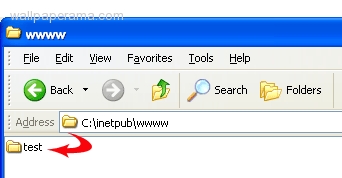
step 2. Open a blank notepad and copy and paste the following code into it:
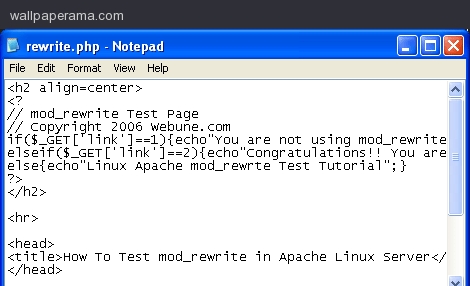
rewrite.php PHP CODE:
step 3. now save the file as rewrite.php in your test directory
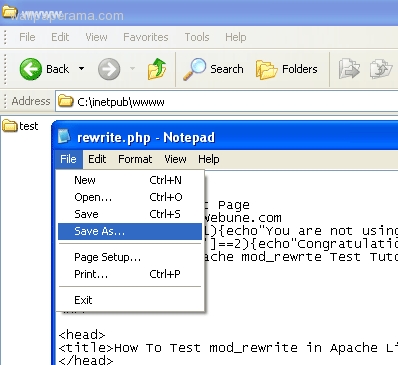
step 4. Open a new blank notepad, we are going to create a file called .htaccess
step 5. Copy and paste the following code:
.htaccess File:
step 6. Save as .htaccess (if you are using notepad as I am, make sure to put quotes in between. example: ".htaccess" otherwise, notepad will create a file called .htacces.txt and we don't need the .txt at the end only .htaccess)
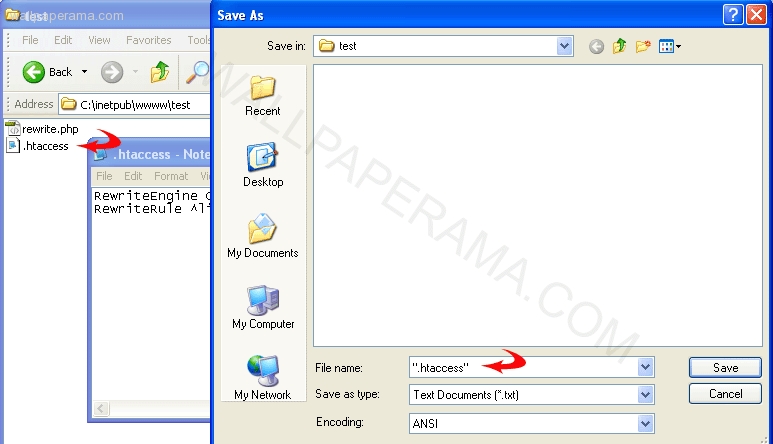
step 7. You should have two files in your test directory: rewrite.php and .htaccess - Now upload the test directory with the two files rewrite.php and .htaccess into your website.
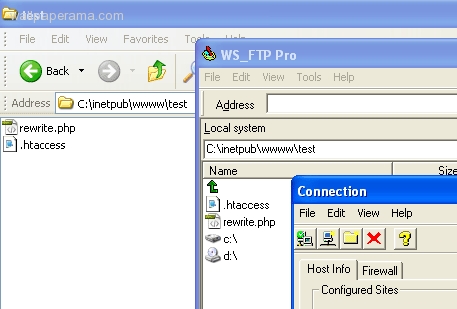
step 8. Open the rewrite.php file with your browser to the location you just uploaded the files. for example: http://www.yoursite.com/test/rewrite.php
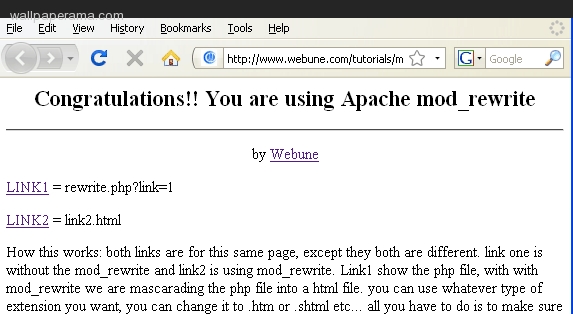
step 9. you should see two links, LINK1 and LINK2 Click on LINK1 and the same page will display.
step 10. Now click on LINK2 and the same page will display with the a mod_rewrite message. If it doesn't you either did something wrong. Check your steps. If you checked your steps, refresh your browser, and if refreshing doesn't work, then you don't have mod_rewrite enabled. if you dont have mod rewrite enabled in your server, then you might see something like this:
Troubleshoot #1:
404 ERROR - If you are getting a 404 Error (Page Not Found) this means you dont have mod_rewrite on your website or you typed the wrong url on your browser.
Troubleshoot #2:
this is the code from the .htaccess file:
RewriteRule ^link([^/]*).html$ rewrite.php?link=$1 [L]
there are some hosting companies that force you to put the absolute path. so you will have to put the absolute path of the rewrite.php file.
for example: lets say i uploaded the script to my website:
http://www.example.com/test/rewrite.php
in the example above, open the .htaccess file and change the code to:
RewriteRule ^link([^/]*).html$ /test/rewrite.php?link=$1 [L]
as you can see from the code above, i have put the absolute path from the website root. so you may have mod rewrite enabled, but you have to modify the .htaccess to match your hosting company requirements.
this is how the .htaccess file would look like:
Advance: if you dont want to do that, you can use RewriteBase, just have to add this line after RewriteEngine On
this is how the .htaccess file would look like using RewriteBase:
Troubleshoot #3:
500 ERROR = a 500 error means that the code you put on your .htaccess has a problem. Apache cannot process the syntax. the most common mistake people make is they type something wrong like misspelled something. so double check to make sure you have exactly the code I provided above. and be sure you have named the files as I told you.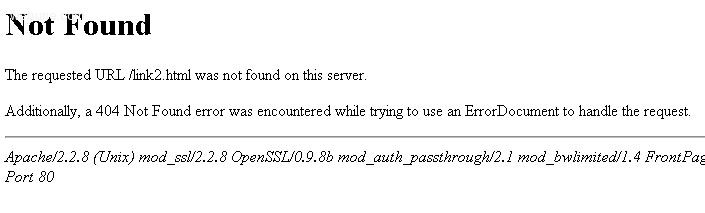
If mod_rewrite is not working for you and you are a Webune customer, please contact our support team to assist you.
View Demo
Click on this link. We have provided uploaded the files in this tutorial to show you how mod_rewrite works.
if creating the files yourself is too complicated, you can download the full script at the bottom of this post.
see a demo:
if you need more help, I provided some other links to other posts on this subject. hope this helps.
thanks.
here is a short video a made to show you how you can enable on linux:
if you need more help, just leave your comments below. I would like to learn from other by telling me why you need to learn mod rewrite so I can make more of these tutorials... Now here is the download i provided if you dont want to create the files by yourself.
Apache Mod_Rewrite module is a really handy and cool feature in Apache Web Server.
With mod_rewrite, you can show a different url than the actual url. you will also help your website make it more search engine friendly by avoiding having the ? (question mark) in your urls.
for example, this topic I am writing right now here at Wallpaperama, I am actually using mod_rewrite, if you look at the url in your browser, its says:
//www.wallpaperama.com/forums/how-to-test-check-if-mod-rewrite-is-enabled-t40.html
but in reality, I am masquerading the actual php url. instead of using this url:
https://www.wallpaperama.com/forums/viewtopic.php?t=40
[UPDATE] this was my old file, i have updated my script so its no longer viewtopic.php - [Im no longer using Apache for this website at this time. instead i am using NGINX but i am still masquerading my urls with nginx rewrite]
if you prefer to download the full script, you can do so by downloading the attachment at the bottom of this post
otherwise, you can continue and create the files yourself:
IMPORTANT!!! - if you are going to follow this tutorial by each step, be sure to name the files as I describe, if you name them something else, the script will fail. so if you dont want to go through the steps, you can download the whole script I provided:
ok, the best way to learn is to actually do it yourself. if you have your website with a web hosting company that has mod_rewrite already enabled, then you shouldn't have any problems. Webune.com customers benefit from apache's mod_rewrite. Every customer being hosted by our shared services has automatically mod_rewrite enabled.
You can confirm if its enable by following this simple tutorial guide. In this tutorial, you will be creating two files, the first one called rewrite.php and the second one .htaccess
- I will be using Windows XP notepad to create my files. ok, lets go..
step 1. to keep this organized, create a new directory (folder) called test
step 2. Open a blank notepad and copy and paste the following code into it:
rewrite.php PHP CODE:
<h2 align=center>
<?php
// mod_rewrite Test Page
// Copyright 2006 Webune.com
if($_GET['link']==1){echo"You are not using mod_rewrite";}
elseif($_GET['link']==2){echo"Congratulations!! You are using Apache mod_rewrite";}
else{echo"Linux Apache mod_rewrte Test Tutorial";}
?>
</h2>
<hr>
<head>
<title>How To Test mod_rewrite in Apache Linux Server</title>
</head>
<body>
<p align="center">by <a href="http://www.webune.com">Webune</a></p>
<p><a href="rewrite.php?link=1">LINK1</a> = rewrite.php?link=1</p>
<p><a href="link2.html">LINK2</a> = link2.html</p>
<p>How this works: both links are for this same page, except they both are different. link one is without the mod_rewrite and link2 is using mod_rewrite. Link1 show the php file, with with mod_rewrite we are masquerading the php file into a html file. you can use whatever type of extension you want, you can change it to .htm or .shtml etc... all you have to do is to make sure you also change it in the .htaccess file</p>
<p><< <a href="http://www.webune.com/forums/viewtopic-p-62.html">Go back to webune forums.</a></p>
</body>
</html>
<?php
// mod_rewrite Test Page
// Copyright 2006 Webune.com
if($_GET['link']==1){echo"You are not using mod_rewrite";}
elseif($_GET['link']==2){echo"Congratulations!! You are using Apache mod_rewrite";}
else{echo"Linux Apache mod_rewrte Test Tutorial";}
?>
</h2>
<hr>
<head>
<title>How To Test mod_rewrite in Apache Linux Server</title>
</head>
<body>
<p align="center">by <a href="http://www.webune.com">Webune</a></p>
<p><a href="rewrite.php?link=1">LINK1</a> = rewrite.php?link=1</p>
<p><a href="link2.html">LINK2</a> = link2.html</p>
<p>How this works: both links are for this same page, except they both are different. link one is without the mod_rewrite and link2 is using mod_rewrite. Link1 show the php file, with with mod_rewrite we are masquerading the php file into a html file. you can use whatever type of extension you want, you can change it to .htm or .shtml etc... all you have to do is to make sure you also change it in the .htaccess file</p>
<p><< <a href="http://www.webune.com/forums/viewtopic-p-62.html">Go back to webune forums.</a></p>
</body>
</html>
step 3. now save the file as rewrite.php in your test directory

step 4. Open a new blank notepad, we are going to create a file called .htaccess
step 5. Copy and paste the following code:
.htaccess File:
RewriteEngine On
RewriteRule ^link([^/]*).html$ rewrite.php?link=$1 [L]
RewriteRule ^link([^/]*).html$ rewrite.php?link=$1 [L]
step 6. Save as .htaccess (if you are using notepad as I am, make sure to put quotes in between. example: ".htaccess" otherwise, notepad will create a file called .htacces.txt and we don't need the .txt at the end only .htaccess)

step 7. You should have two files in your test directory: rewrite.php and .htaccess - Now upload the test directory with the two files rewrite.php and .htaccess into your website.

step 8. Open the rewrite.php file with your browser to the location you just uploaded the files. for example: http://www.yoursite.com/test/rewrite.php

step 9. you should see two links, LINK1 and LINK2 Click on LINK1 and the same page will display.
step 10. Now click on LINK2 and the same page will display with the a mod_rewrite message. If it doesn't you either did something wrong. Check your steps. If you checked your steps, refresh your browser, and if refreshing doesn't work, then you don't have mod_rewrite enabled. if you dont have mod rewrite enabled in your server, then you might see something like this:
TROUBLESHOOT:
Troubleshoot #1:
404 ERROR - If you are getting a 404 Error (Page Not Found) this means you dont have mod_rewrite on your website or you typed the wrong url on your browser.
Troubleshoot #2:
this is the code from the .htaccess file:
RewriteRule ^link([^/]*).html$ rewrite.php?link=$1 [L]
there are some hosting companies that force you to put the absolute path. so you will have to put the absolute path of the rewrite.php file.
for example: lets say i uploaded the script to my website:
http://www.example.com/test/rewrite.php
in the example above, open the .htaccess file and change the code to:
RewriteRule ^link([^/]*).html$ /test/rewrite.php?link=$1 [L]
as you can see from the code above, i have put the absolute path from the website root. so you may have mod rewrite enabled, but you have to modify the .htaccess to match your hosting company requirements.
this is how the .htaccess file would look like:
RewriteEngine On
# CREATED BY WEBUNE.COM
RewriteRule ^link([^/]*).html$ /test/rewrite.php?link=$1 [L]
# CREATED BY WEBUNE.COM
RewriteRule ^link([^/]*).html$ /test/rewrite.php?link=$1 [L]
Advance: if you dont want to do that, you can use RewriteBase, just have to add this line after RewriteEngine On
this is how the .htaccess file would look like using RewriteBase:
RewriteEngine On
RewriteBase /test/
# CREATED BY WEBUNE.COM
RewriteRule ^link([^/]*).html$ rewrite.php?link=$1 [L]
RewriteBase /test/
# CREATED BY WEBUNE.COM
RewriteRule ^link([^/]*).html$ rewrite.php?link=$1 [L]
Troubleshoot #3:
500 ERROR = a 500 error means that the code you put on your .htaccess has a problem. Apache cannot process the syntax. the most common mistake people make is they type something wrong like misspelled something. so double check to make sure you have exactly the code I provided above. and be sure you have named the files as I told you.

If mod_rewrite is not working for you and you are a Webune customer, please contact our support team to assist you.
View Demo
Click on this link. We have provided uploaded the files in this tutorial to show you how mod_rewrite works.
if creating the files yourself is too complicated, you can download the full script at the bottom of this post.
see a demo:
if you need more help, I provided some other links to other posts on this subject. hope this helps.
thanks.
HELP
Here are some links to help you in case you are having trouble or its not working for you see related linkshere is a short video a made to show you how you can enable on linux:
if you need more help, just leave your comments below. I would like to learn from other by telling me why you need to learn mod rewrite so I can make more of these tutorials... Now here is the download i provided if you dont want to create the files by yourself.
12-p1396-test-modrewrite.zip
Ryan
Thu Apr 03, 2008
James
Thu Oct 23, 2014
That tells you if the module is 'on', it doesn't tell you if it's actually working.
bruce
Tue Jan 07, 2014
the error i am getting says:
testing mod rewrite and .htaccess file... could not validate that he .htaccess file had been created on the file server or that mod rewrite was enabled, please check and try again
testing mod rewrite and .htaccess file... could not validate that he .htaccess file had been created on the file server or that mod rewrite was enabled, please check and try again
tartanphoenix
Sun Mar 04, 2012
This wasn't working for me until I added this as a second line
RewriteBa /test/
hauke
Wed Jan 11, 2012
thx, for the script
raven
Mon Oct 24, 2011
really handy little script - good work guys
this is a far easier method....
https://www.wallpaperama.com/forums/how-to-test-check-if-mod-rewrite-is-enabled-t40.html