How To Search And Replace Text With Linux VI Editor
This Page Contains information about How To Search And Replace Text With Linux VI Editor By wallpaperama in category Linux Hosting with 3 Replies. [519], Last Updated: Sat May 18, 2024
wallpaperama
Thu Sep 04, 2008
3 Comments
9951 Visits
ok, if you are wanting to know how you can find and replace text in a file in linux you are in luck, i will show you how..
lets say i have a file called wallpaperama.txt and this is what the files has:
Wallpaperama is an amazing collection of high resolution quality free wallpapers.
you can download your favorite wallpaper for free.
tell your friends about walllpaperama
you can vote for your favorite wallpaper
surf with confidence, all our wallpaper dont have spyware.
we hate spam, so we wouldn't give you that either.
we hope you enjoy our beautiful wallpapers
ok, on the example text file above, lets say i want to change all the 'wallpaper' to 'screensaver' well this is how you would do it..
lets assume that wallpaperama.txt is located on my home directory at: /home/me/wallpaperama.txt
step 1. open the file with the vi editor:
step 2. Enter - SHIFT + : (the Shift key and the colon key at the same time) on your keyboard, the screen will look like this:
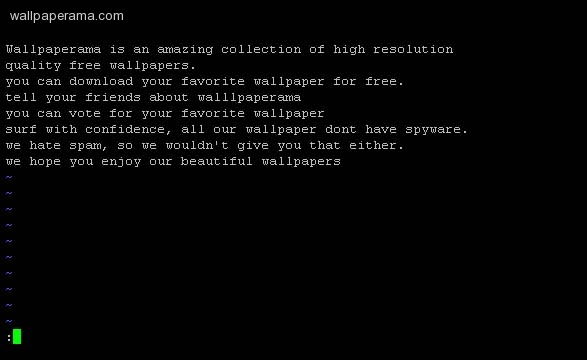
step 3. now enter this command and hit enter
step 4. now you will see that all the text 'wallpaper' was changed to 'screensaver'
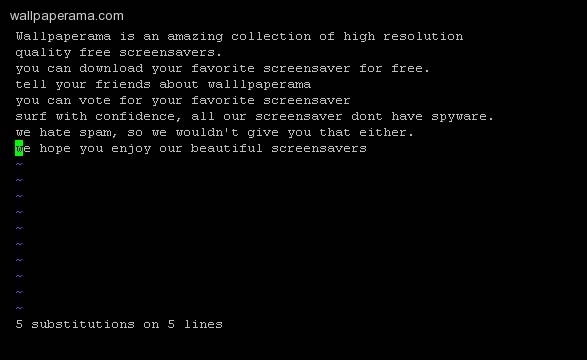
step 5. save the change with this command:
DONE
i hope this helps you
lets say i have a file called wallpaperama.txt and this is what the files has:
Wallpaperama is an amazing collection of high resolution quality free wallpapers.
you can download your favorite wallpaper for free.
tell your friends about walllpaperama
you can vote for your favorite wallpaper
surf with confidence, all our wallpaper dont have spyware.
we hate spam, so we wouldn't give you that either.
we hope you enjoy our beautiful wallpapers
ok, on the example text file above, lets say i want to change all the 'wallpaper' to 'screensaver' well this is how you would do it..
lets assume that wallpaperama.txt is located on my home directory at: /home/me/wallpaperama.txt
step 1. open the file with the vi editor:
vi /home/me/wallpaperama.txt
step 2. Enter - SHIFT + : (the Shift key and the colon key at the same time) on your keyboard, the screen will look like this:
step 3. now enter this command and hit enter
:%s/wallpaper/screensaver/g
step 4. now you will see that all the text 'wallpaper' was changed to 'screensaver'
step 5. save the change with this command:
:qw
DONE
i hope this helps you
OptimusPrime
Sun Feb 26, 2012
Dude, whats is the meaning of %? and s= search? I'm newbie at linux...

moster
Thu Sep 04, 2008
this might help you also:
Vi: Search and Replace
Change to normal mode with <ESC>.
Search (Wraped around at end of file):
Search STRING forward : / STRING.
Search STRING backward: ? STRING.
Repeat search: n
Repeat search in opposite direction: N (SHIFT-n)
Replace: Same as with sed, Replace OLD with NEW:
First occurrence on current line: :s/OLD/NEW
Globally (all) on current line: :s/OLD/NEW/g
Between two lines #,#: :#,#s/OLD/NEW/g
Every occurrence in file: :%s/OLD/NEW/g
https://www.wallpaperama.com/forums/how-to-search-and-replace-text-with-linux-vi-editor-t6332.html
Vi: Search and Replace
Change to normal mode with <ESC>.
Search (Wraped around at end of file):
Search STRING forward : / STRING.
Search STRING backward: ? STRING.
Repeat search: n
Repeat search in opposite direction: N (SHIFT-n)
Replace: Same as with sed, Replace OLD with NEW:
First occurrence on current line: :s/OLD/NEW
Globally (all) on current line: :s/OLD/NEW/g
Between two lines #,#: :#,#s/OLD/NEW/g
Every occurrence in file: :%s/OLD/NEW/g
https://www.wallpaperama.com/forums/how-to-search-and-replace-text-with-linux-vi-editor-t6332.html