How To Reset Linux Root Forgotten Passwords Get Retrieve Root Password
this tutorial guide will show you step by step with pictures and images on how to reset your root password in linux if you have forgotten. resetting is easy just follow as its showing you how to retrieve your system admin password through the command [420], Last Updated: Sat May 18, 2024
wallpaperama
Wed Mar 14, 2007
50 Comments
72456 Visits
The other day, i inherited a server which was admin by another company. Now i am expected to login into the linux server and make some changes and update some stuff, but the problem is that the previous admin person did not give me the root password for the server. So today, i found a way on how to retrieve the root password from a linus server.
DISCLAIMER: By you continuing to read this how to guide, you are in agreement that you have permission to access your linux server. Use this information at your own risk, I take no liability for any contents of this post. this information should only be used to recover passwords from machines you have legal access to. If you use this informationt obreak or hack into someone else's systems, then I am not responsible for it. Also, you are advised to make any backups of your system before continuiing.
please note that you cannot perform this remotely, you must be physically at the machine.
1. the first step is to reboot server.
2. Since the server i inherit has GRUB, wait until the grub splash screen comes on and hit the letter 'e' on your keyboard. this will stop grub.
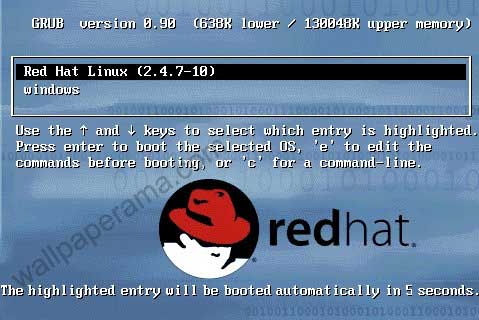
3. hit 'e' again and this will take you to another screen
4. you should see one of the choices has "kernel" select the one with "kernel
5. hit 'e' on your keyboard
6. type ' single' (make sure to include a space before "single") and hit enter. then enter 'b' to boot.
7. your system should boot up in single mode as root
8. now that you are logged in single mode you can chage the root password by sending this command:
9. after you have changed the root password, reboot server and you should be able to login with the new password.
DONE
LILO ----------------------------
1. If you have LILO, its different, fist reboot server and when you see the LILO: prompt type "linux single" and hit enter. this will log you in as root in single user mode.
2. Once booting is complete, you can change your password with this command:
DONE
i hope that works for you
DISCLAIMER: By you continuing to read this how to guide, you are in agreement that you have permission to access your linux server. Use this information at your own risk, I take no liability for any contents of this post. this information should only be used to recover passwords from machines you have legal access to. If you use this informationt obreak or hack into someone else's systems, then I am not responsible for it. Also, you are advised to make any backups of your system before continuiing.
please note that you cannot perform this remotely, you must be physically at the machine.
1. the first step is to reboot server.
2. Since the server i inherit has GRUB, wait until the grub splash screen comes on and hit the letter 'e' on your keyboard. this will stop grub.
3. hit 'e' again and this will take you to another screen
4. you should see one of the choices has "kernel" select the one with "kernel
5. hit 'e' on your keyboard
6. type ' single' (make sure to include a space before "single") and hit enter. then enter 'b' to boot.
7. your system should boot up in single mode as root
8. now that you are logged in single mode you can chage the root password by sending this command:
CODE:
passwd
9. after you have changed the root password, reboot server and you should be able to login with the new password.
DONE
LILO ----------------------------
1. If you have LILO, its different, fist reboot server and when you see the LILO: prompt type "linux single" and hit enter. this will log you in as root in single user mode.
2. Once booting is complete, you can change your password with this command:
CODE:
passwd
and reboot server.DONE
i hope that works for you
kdev
Thu Jan 08, 2009
thanks for the post. was useful and it worked for me in changing my redhat password.
mildred
Fri Oct 31, 2008
it worked hey,i big you up dude
rooter
Sun Jan 12, 2014
when i try this on my virtual server it worked like a charm but i have no way to access the splash screen on my remote server. is there a way to do this just one the command line? i dont think i have a choice but to reprovision my server
Ashok
Tue May 01, 2012
Thanks you, it worked fine
shrishail
Tue Apr 17, 2012