How To Put An Icon On Your Browser URL Address Bar Favicon.ico Post Description:
Post Tags: how, to, put, an, icon, on, your, browser, url, address, bar, faviconico, Babes, free computer Wallpapers, women, girls, beautiful, woman This Post Has Been Viewed 11958 Times Since Sun Sep 03, 2006 8:41 pm Posted By webmaster with 42 replies
How To Put An Icon On Your Browser URL Address Bar Favicon.ico
Have you ever noticed that when you visit some web site, there is an icon small (little) image that shows (appears) at the top of your browser?
If you have, today you are going to learn how to install an icon picture for your web site, so when users visit your website, you can put your logo. Even better when a visitor bookmarks your url, the browser automatically saves in their favorites to identify your site.
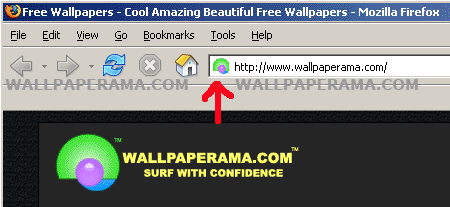
Here is how to do this:
1. If you have windows, open paint. You can find it in:
Start > Programs > Accessories
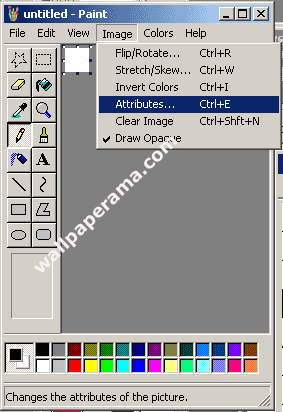
2. Set the dimensions to 24x24 pixels: in Image > Attributes (Control - E)
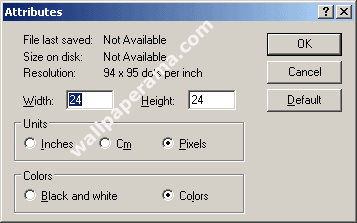
3. Set Width to 24 and Height to 24 and Click Ok.
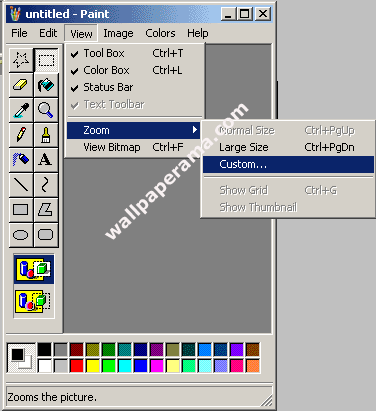
4. To help you create and edit your image better, zoom paint to the highest zoom which is 800%.
To do this, go to View > Zoom > Custom and Select 800%
5. Create your logo or whatever you want your icon to look like:
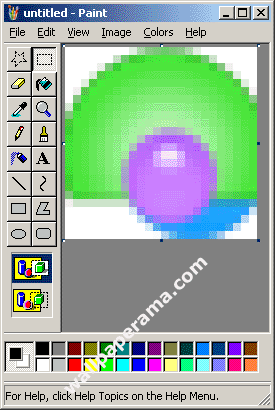
6. After you have created your image, save as "favicon.ico"
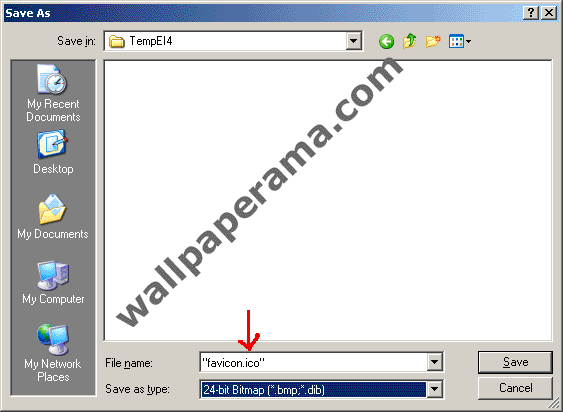
7. Now all you have to do is upload the favicon.ico image to your website root directory. The root directory is the main folder where all your files reside at, like your main index page. Some hosting companies will provide a directory called "html" or "public" or "web" "public_html". You MUST upload to your website root directory, otherwise, your browser will look for the favicon.ico image, will not find it and it will not display it on your browser.
put the following HTML code in between your <head> tags with the follwowing code:
NOTE: There might other easy ways to do this, but this is the only way I know of. If you have a better suggestion, please help us by posting it here.
If you have benefit from this small quick and easy to use step-by-step tutorial, we would appreciate if you link to wallpaperama.com Why link to us? The more sites that link to us, the more people like you will be able to find this free and helpful post.
Thanks,
Wallpaperama Team

Leave Your Comments
Share
URL:
You can use this HTML code to put it on your website to show your friends this wallpaper. Use this code on your profile like myspace, friendster, Facebook or others. Just Copy and Paste it in your HTML on your websites
Fourms BBCODE:
BBCODE is use on forums. You can put this code on all your BBCODE enabled forums like PhpBB, vBulletin® and others. Just Copy and Paste this code on your Posts and Replies on your forums
Comments and replies About How To Put An Icon On Your Browser URL Address Bar Favicon.ico
:: 1 :: Reply #15239 Reply By Vasanth On Fri Aug 10, 2007 7:28 pm
does it show in internet explorer
:: 2 :: Reply #24212 Reply By Dhiraj singh On Sun Oct 14, 2007 4:14 am
kuch samajh main nahi aaya.
mere mail per iski detail bhej dijiye......
ki kaise hum apna logo browser main laga sakte hai......
:: 4 :: Reply #24481 Reply By huseyin On Tue Oct 16, 2007 10:54 am
thank you i did it,you explain it very well especially pictures make it easy to understand...:)
:: 5 :: Reply #25900 Reply By John Cena On Sat Oct 27, 2007 9:21 pm
hi this is wwe super star john cena.
a very important message to all our friends,
the wwe superstar are professionaly trained.plz do into a ring,home or school.
stay safe
&
don't try this.
john cena.
:: 6 :: Reply #27059 Reply By rakesh On Fri Nov 09, 2007 4:14 am
did show on firefox. but did not show on internet explorer. any ideas why ?
:: 7 :: Reply #32483 Reply By Larry On Fri Dec 21, 2007 8:23 am
great way of doing it. i did notice the same thing that it does not work in ie. any idea way??
:: 8 :: Reply #32591 Reply By deep On Sat Dec 22, 2007 5:34 am
it not work on internet explorer.
why
:: 9 :: Reply #34653 Reply By Mohit Taunk On Fri Jan 04, 2008 10:28 pm
there is some other way to create favicon. in photoshop you make your icon in size of 16 x 16 pixel. and save as it to favicon.icon format. but it is work after you save the plugin of icon in photoshop plugin folder.
:: 10 :: Reply #36549 Reply By icno On Tue Jan 15, 2008 1:39 pm
how to add a shortcut icon to a web page
internet explorer 5+ has the facility to let you include an icon to represent your site that is retrieved every time visitors bookmark your site. when the user looks at their favourites they will see your icon. if they go to that bookmarked page they will also see your icon at the left end of the address window in the toolbar. it also appears in windows explorer thumbnails.
if you want the icon to appear you must upload a file named favicon.ico into the root directory (you might want to insert the ico file into individual folders and sub-webs just to make sure) or (if you do not have access to the server - i.e. you are with a free host) every directory and subdirectory or every location that might be book marked by your visitors. - it is best to do this anyway as other browsers other an internet explorer would probably use this as the standard. besides which this means you can use different ico files for different sections of your site, but if you just want to use a universal ico call it favicon.ico.
:: 11 :: Reply #41499 Reply By Michael On Sat Feb 16, 2008 9:18 am
i found ur script useful guy..
if any body knows a site where i could learn hacking..plz mail me the url(web address) to michael_pra1 at myemail.co.in...i will surely use it for a good purpose.
:: 12 :: Reply #41500 Reply By Michael On Sat Feb 16, 2008 9:20 am
i found ur script useful guy..
if any body knows a site where i could learn hacking..plz mail me the url(web address) to michael_pra1 at the rateof myemail.co.in.i will surely use it for a good purpose.
:: 13 :: Reply #43562 Reply By Renu On Fri Feb 29, 2008 1:49 am
nice
it is very useful for me
:: 14 :: Reply #43948 Reply By rekno On Sun Mar 02, 2008 3:42 pm
nice work the tip help
:: 15 :: Reply #45126 Reply By Wanksta On Tue Mar 11, 2008 11:46 pm
do you have to name the icon favicon or can you give it any name?
:: 16 :: Reply #48366 Reply By 44 On Wed Apr 02, 2008 9:36 pm
fu*k this!!
:: 17 :: Reply #48728 Reply By Mastermind On Sat Apr 05, 2008 8:36 am
thanks man i been searching for this one. i really owe u one. you r great wallpaperama . luv u
bye
:: 18 :: Reply #49484 Reply By haley On Thu Apr 10, 2008 12:57 pm
hey how do u get john cena backrounds on you tube ????????????
please help
:: 19 :: Reply #51378 Reply By Preeti On Wed Apr 23, 2008 11:30 pm
favicon icon not appear in internet explorer address bar but appear in mozilla. how to add favicon icon in website address and it should appear in internet explorer,
:: 20 :: Reply #56819 Reply By mandeep On Sat Jun 07, 2008 1:11 am
hi
i used the same method, but still the picture is visible in the browser.
:: 21 :: Reply #56820 Reply By mandeep On Sat Jun 07, 2008 1:12 am
hi
i used the same method but still the picture is not visible in the browser
:: 22 :: Reply #57215 Reply By Alok Gupta On Mon Jun 09, 2008 7:57 pm
this "favicon.ico" code if fine but this is not working in internet explorer. it is fine for mozilla. please let me know how it will be done on ie.
thanks.
alok
:: 23 :: Reply #59755 Reply By PUnjabi Tone On Mon Jun 30, 2008 4:55 am
nice
world of music - pbtone â download free music , wallpaper , themes , ringtones , applicatins . n much more!!
:: 24 :: Reply #62100 Reply By dadhichid On Thu Jul 17, 2008 12:18 am
i followed all your steps on my website lightinlife
but despite that no favicon is visible in url. can you please tell me the reason. what is the remedy.
regards
dadhichid
:: 25 :: Reply #62397 Reply By dahlla On Sat Jul 19, 2008 1:12 am
just to say thanks a lot for ur tip.
c u soon
:: 26 :: Reply #64002 Reply By Ben Silverstein On Wed Jul 30, 2008 8:41 am
thanks! i'll try it for as-seen-on-youtube
:: 27 :: Reply #64099 Reply By Mohan On Wed Jul 30, 2008 7:41 pm
its very simple solution,its clear my long days doubt
thaks a lot
:: 28 :: Reply #65213 Reply By Aditya R Jethwa On Wed Aug 06, 2008 7:59 pm
thanks!!!!!!! thats works fine....
friends you should install iis service for windows to work with this code. it comes with windows optional component.
:: 29 :: Reply #65244 Reply By dan On Thu Aug 07, 2008 2:16 am
hi, i made my own favicon myemailstatus.ro
:: 30 :: Reply #68421 Reply By amine On Thu Aug 28, 2008 3:14 am
thanks i'll do it and submit this tip to the webmasters article directory made4webmasters so other webmasters can see it
:: 31 :: Reply #68422 Reply By amine On Thu Aug 28, 2008 3:16 am
thanks again the url is made4webmasters
:: 32 :: Reply #68816 Reply By Miles On Sun Aug 31, 2008 7:09 am
thank you for your lesson on favicon.ico...very helpfull !!
:: 33 :: Reply #70428 Reply By WAN FARHAN On Sat Sep 13, 2008 7:51 am
wow...its work! thanks!
selangorfanatik.t35
:: 34 :: Reply #70601 Reply By snk On Sun Sep 14, 2008 1:14 pm
thanks so much for this helpful info.
it was really easy to follow and it worked just like the article says.
thanx again
:: 35 :: Reply #70843 Reply By Roxgirlxoxo On Tue Sep 16, 2008 2:47 pm
omg thank you
:: 36 :: Reply #71594 Reply By Cris Gloss On Mon Sep 22, 2008 7:02 am
Thanks for carrying this item. I was very excited to learn how to do it, as I consider it a very nice touch. Unfortunately, your code is ambiguous, as you do not include the www.yourdomain.com[.country]/ which I picked up from the source code for your own page, namely: << link rel="shortcut icon" > href="http://www.wallpaperama.com/favicon.ico" No problem. Aussies Rule!
:: 37 :: Reply #71666 Reply By barbara reiner On Mon Sep 22, 2008 2:15 pm
thanks-really appreciate this...very clear
:: 38 :: Reply #73908 Reply By Wigley On Sat Oct 04, 2008 4:39 pm
gee, thanks heaps... but it didn't work until i read cris gloss' comment, cheers. it really does make or break a page having small details like that :)
ohnomer
:: 39 :: Reply #75124 Reply By dorian hodge On Sun Oct 12, 2008 10:16 am
thanks man i see people have all the time but did not know how. this was very quick and easy.
you can do it with photoshop as well save it as a gif with the size 24 x 24, then after save just change the .jif to .ico and it worked for me my site is bviwebtv
:: 40 :: Reply #75257 Reply By Net Play On Mon Oct 13, 2008 5:36 am
playndownload /
:: 41 :: Reply #77096 Reply By nice On Fri Oct 24, 2008 7:01 am
download free songs, wallpapers, mobile stuff, games, video songs n much more for free only at pbtone
:: 42 :: Reply #79511 Reply By adithya On Wed Nov 05, 2008 10:53 pm