How To Pass Variable Values From Javascript Html To Swf Flash Fla
This Page Contains information about How To Pass Variable Values From Javascript Html To Swf Flash Fla By wallpaperama in category Tutorial And Guides with 3 Replies. [1490], Last Updated: Sat May 18, 2024
wallpaperama
Thu Jan 29, 2009
3 Comments
2162 Visits
im slowly learning about flash. im playing around with flash 10 cs4 and its like learning a whole new programming language. one of my questions in my mind was how can you pass information from html and get that information to display on a flash movie. or the reverse, get a variable string from a flash movie (.swf) to html. how about if i had a form? well, i was able to do this. so hopefluly you can learn how you can start making flash movies. so in my example, i will create a form with two fields. i am using adobe flash cs4 version 10.
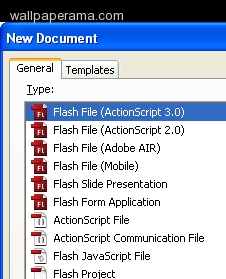
1. create new flash file with ActionScript 3.0
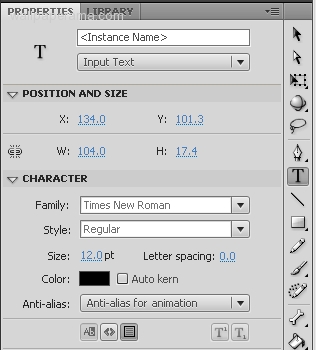
2. with the text tool create two input fields and give them instance names:
sending_ti
received_ti
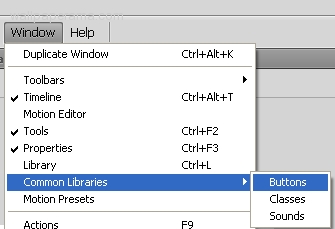
3. now create a button with instance name of send_button - if you dont know how to create a button, just go to Window > Common Libraries > Buttons
4. now hit F9 to open your Actions window and copy and paste this actionscript into the actionscript area:
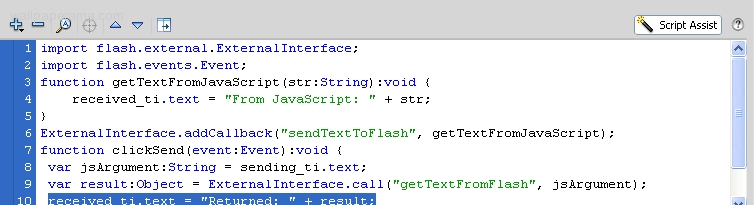
ActionScript CODE:
5. you are done with the action scripting. now create your .swf file and html by publishing your document and save it as wallpaperama-flash.fla
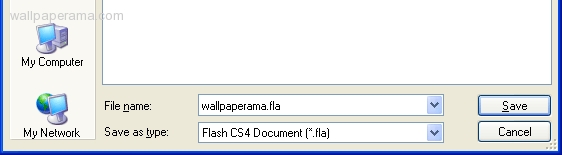
6. you will see the flash create two files:
wallpaperama.fla
wallpaperama.html
7. open wallpaperama.html and edit. copy and paste this javascript code between the <head> and </head> html tags:
8. now put the html form code anywhere you want betweend the <body> and </body> tags
9. save the changes. now upload both files into your server and open wallpaperama.html with your browser from your website and see it in action.
NOTE: if you try to run the wallpaperama.html from your local computer you will get this error:
ok, if you are too lazy to do it, you can download the whole tutorial files i have provided:
wallpaperama-flash-example.zip
hope that helps
1. create new flash file with ActionScript 3.0
2. with the text tool create two input fields and give them instance names:
sending_ti
received_ti
3. now create a button with instance name of send_button - if you dont know how to create a button, just go to Window > Common Libraries > Buttons
4. now hit F9 to open your Actions window and copy and paste this actionscript into the actionscript area:
ActionScript CODE:
import flash.external.ExternalInterface;
import flash.events.Event;
function getTextFromJavaScript(str:String):void {
received_ti.text = "From JavaScript: " + str;
}
ExternalInterface.addCallback("sendTextToFlash", getTextFromJavaScript);
function clickSend(event:Event):void {
var jsArgument:String = sending_ti.text;
var result:Object = ExternalInterface.call("getTextFromFlash", jsArgument);
received_ti.text = "Returned: " + result;
}
send_button.addEventListener("click", clickSend);
import flash.events.Event;
function getTextFromJavaScript(str:String):void {
received_ti.text = "From JavaScript: " + str;
}
ExternalInterface.addCallback("sendTextToFlash", getTextFromJavaScript);
function clickSend(event:Event):void {
var jsArgument:String = sending_ti.text;
var result:Object = ExternalInterface.call("getTextFromFlash", jsArgument);
received_ti.text = "Returned: " + result;
}
send_button.addEventListener("click", clickSend);
5. you are done with the action scripting. now create your .swf file and html by publishing your document and save it as wallpaperama-flash.fla
6. you will see the flash create two files:
wallpaperama.fla
wallpaperama.html
7. open wallpaperama.html and edit. copy and paste this javascript code between the <head> and </head> html tags:
<script language="JavaScript">
function getFlashMovie(movieName) {
var isIE = navigator.appName.indexOf("Microsoft") != -1;
return (isIE) ? window[movieName] : document[movieName];
}
function formSend() {
var text = document.htmlForm.sendField.value;
getFlashMovie("ExternalInterfaceExample").sendTextToFlash(text);
}
function getTextFromFlash(str) {
document.htmlForm.receivedField.value = "From Flash: " + str;
return str + " received";
}
</script>
function getFlashMovie(movieName) {
var isIE = navigator.appName.indexOf("Microsoft") != -1;
return (isIE) ? window[movieName] : document[movieName];
}
function formSend() {
var text = document.htmlForm.sendField.value;
getFlashMovie("ExternalInterfaceExample").sendTextToFlash(text);
}
function getTextFromFlash(str) {
document.htmlForm.receivedField.value = "From Flash: " + str;
return str + " received";
}
</script>
8. now put the html form code anywhere you want betweend the <body> and </body> tags
<form name="htmlForm" method="POST" action="javascript:formSend();">
Sending to ActionScript:<br />
<input type="text" name="sendField" value="" /><br />
<input type="submit" value="Send" /><br />
<br />
Received from ActionScript:<br />
<input type="text" name="receivedField">
</form>
Sending to ActionScript:<br />
<input type="text" name="sendField" value="" /><br />
<input type="submit" value="Send" /><br />
<br />
Received from ActionScript:<br />
<input type="text" name="receivedField">
</form>
9. save the changes. now upload both files into your server and open wallpaperama.html with your browser from your website and see it in action.
NOTE: if you try to run the wallpaperama.html from your local computer you will get this error:
SecurityError: Error #2060: Security sandbox violation: ExternalInterface caller file:///C:/localserver/mysties/wallpaperma.swf cannot access file:///C:/localserver/mysties/wallpaperma.html.
at flash.external::ExternalInterface$/_initJS()
at flash.external::ExternalInterface$/addCallback()
at ExternalInterfaceExample_fla::MainTimeline/frame1()
at flash.external::ExternalInterface$/_initJS()
at flash.external::ExternalInterface$/addCallback()
at ExternalInterfaceExample_fla::MainTimeline/frame1()
ok, if you are too lazy to do it, you can download the whole tutorial files i have provided:
wallpaperama-flash-example.zip
hope that helps
albert
Thu Feb 17, 2011
Olden
Fri Jun 18, 2010
This is great, thank you! I had been trying to figure this out myself. One question though -- this doesn't seem to work in Firefox (3.5.9), only in Explorer. Do you find this to be the case as well?
izu
Fri Jan 15, 2010
hi there, I'm very thank you because you tutorial really help me.. seriously...thank you very much.. i have been working to pass value from html to AS3..n it is working successfully...
https://www.wallpaperama.com/forums/how-to-pass-variable-values-from-javascript-html-to-swf-flash-fla-t7037.html