How To Disable Apache File And Directory Indexing?
This Page Contains information about How To Disable Apache File And Directory Indexing? By apache server in category Linux Hosting with 3 Replies. [518], Last Updated: Sat May 18, 2024
apache server
Thu Sep 04, 2008
3 Comments
4991 Visits

today i noticed something of a security issue with my apacher server. i have a linux (unix) machine running fedora core 7 from RedHat and i noticed that when i go to a url that doesn't have an index file like index.html, or index.htm or index.php and so on, it show/displays all the files in that directory. well, i want to be able to hide all these files and instead show something else, like an error or something. i think this is error 404
anyway, this is how my page looks like, as you can see, it shows and displays my files, which i dont want them to be shown to my visitors. as you can see from this picture, is says:
index of /forums/images/ and parent directory and it lists all my files, i want to avoid having to list my files.
how do i do this?
anyway, this is how my page looks like, as you can see, it shows and displays my files, which i dont want them to be shown to my visitors. as you can see from this picture, is says:
index of /forums/images/ and parent directory and it lists all my files, i want to avoid having to list my files.
how do i do this?
Angel
Mon Jul 06, 2009
apacher
Thu Sep 04, 2008
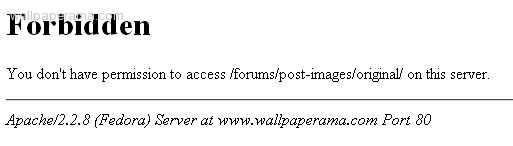
thanks for helping me, i was able to fix it, it was just what i was looking for, now i see a forbidden message instead of the listing of all my files..
thank you
https://www.wallpaperama.com/forums/how-to-disable-apache-file-and-directory-indexing-t6331.html
thank you
https://www.wallpaperama.com/forums/how-to-disable-apache-file-and-directory-indexing-t6331.html
wallpaperama
Thu Sep 04, 2008
yes, i have a wallpaper website also, i had to actually make the changes on my httpd.conf file in my apacher linux server.
i have fedora core 7 also, and what i had to do was make some changes on my httpd.conf file located at:
/etc/httpd/conf/httpd.conf
so this is what i did:
1. login as root
2. send this command:
3. find your virtual host for yoru site and replace this line:
4. with this:
5. save my changes
6. restart apache server:
DONE
hope this helps
i have fedora core 7 also, and what i had to do was make some changes on my httpd.conf file located at:
/etc/httpd/conf/httpd.conf
so this is what i did:
1. login as root
2. send this command:
nano /etc/httpd/conf/httpd.conf
3. find your virtual host for yoru site and replace this line:
Options +Indexes +FollowSymLinks
4. with this:
Options +Includes -Indexes
5. save my changes
6. restart apache server:
/etc/init.d/httpd restart
DONE
hope this helps
Related Content
- How To Find What Apache Version Is Installed In My Web Server
- Where To Find Apache Directory On Linux Server
- How To Change The Session Time Out Settings In Apache Server?
- How To Enable If-Modified-Since Apache Web Server With Linux
- How To Make Apache Server Start At Bootup When Starting Linux
- How To Restart Apache Server Linux Shell Command With Httpd Start Stop Unix
- How To Find Apache Version Installed Linux Windows Server
- How To Change Memory Limit in Your PHP Apache Server
- How To Fix Fatal error: Class 'SoapVar' not found in PHP Apache Linux Server
- Apache Http Server Has Encountered A Problem Needs To Be Closed
search <directory must have the path to the directory root for public files, and change the options line to options none.