You Should Change Your Battery Or Switch To Outlet Power Immediately
This Page Contains information about You Should Change Your Battery Or Switch To Outlet Power Immediately By notebooks in category Windows Hosting with 11 Replies. [582], Last Updated: Sat May 18, 2024
notebooks
Mon Feb 04, 2008
11 Comments
3901 Visits
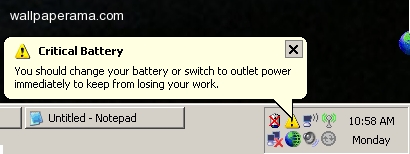
i was wondering if you know about this error ive been getting on my laptop, i get this balloon pop up that say:
i have connected power to it but it doesnt seem to go away
Critical Battery:
you should change your battery or switch to outlet power immediately to keep from losing your work
you should change your battery or switch to outlet power immediately to keep from losing your work
i have connected power to it but it doesnt seem to go away
critical
Mon Feb 04, 2008
RON
Mon Feb 20, 2012
I GET THIS MESSAGE ON MY TOSHIBA PC.
"CRITICAL BATTERY YOU SHOULD CHANGE YOUR BATTERY OR SWITCH TO OUTLET POWER IMMEDIATELY TO KEEP FROM LOSING YOUR WORK."
I KNOW WHT THIS WOULD MEAN ON A LAPOP, BUT ON A PC, VE NO CLUE
"CRITICAL BATTERY YOU SHOULD CHANGE YOUR BATTERY OR SWITCH TO OUTLET POWER IMMEDIATELY TO KEEP FROM LOSING YOUR WORK."
I KNOW WHT THIS WOULD MEAN ON A LAPOP, BUT ON A PC, VE NO CLUE
Daniel
Sat Mar 02, 2013
Hello Ron - Sorry so long to ask but this just happened. You say you know how to fix, or what it means on a laptop? Great! Mine is a toshiba laptop and the error message about the battery switch only happened to me today. If you still here and get thyis message and know how to fix, I would greatly appreciate you explaining it to me before something happens either to the laptop or the battery. Thanx!
Tim
Tue Feb 21, 2012
on a pc it means that an ups that is connected with the pc (normally with an usb cable)that the battery of that device is broke.
so you need to replace a new battery in that device.
so you need to replace a new battery in that device.
makenzi
Mon Nov 05, 2012
you suck!!!! love you girk!!! my kindle doesnt work!!
Mattttttt
Mon Feb 13, 2012
I have done that many times, but my laptop keeps going to standby mode. What can I do?
https://www.wallpaperama.com/forums/you-should-change-your-battery-or-switch-to-outlet-power-immediately-t5699.html
https://www.wallpaperama.com/forums/you-should-change-your-battery-or-switch-to-outlet-power-immediately-t5699.html
sonodaumi (Korea, Republic of)
Thu Jul 16, 2020
when my windows laptop's battery is critically low, it says:
"your battery is very low 7% plug in your pc now!!!!!!!!!"
"your battery is very low 7% plug in your pc now!!!!!!!!!"
thanks