Process On How To Replace Timing Belt On Nissan Car 300zx
This Page Contains information about Process On How To Replace Timing Belt On Nissan Car 300zx By wallpaperama in category Blogs with 1 Replies. [1818], Last Updated: Tue Feb 07, 2023
wallpaperama
Sat Jul 05, 2008
1 Comments
6060 Visits
replacing a timing belt is alot of work, if you take it to the dealership is alot of money. so if you are wondering how much will a timing belt replacement will cost, you are looking at 1500 dollars.
if you dont know what you are doing, its best to leave it to the professionals, but if you know about cars you can follow this short tutorial..
1. remove fan cover and fan
2. remove alternator belt, power steering belt and ac belt
3. remove harmonic balancer
3. remove radiator hose
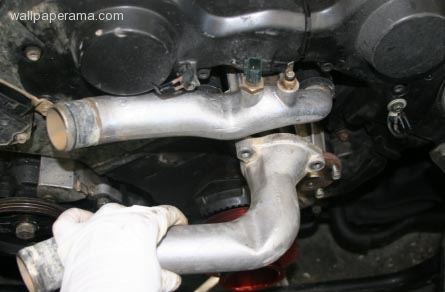
4. remove timing belt plastic covers, there are two at the top and one at the bottome.
now that you have remove all the above, your engine will look like this:
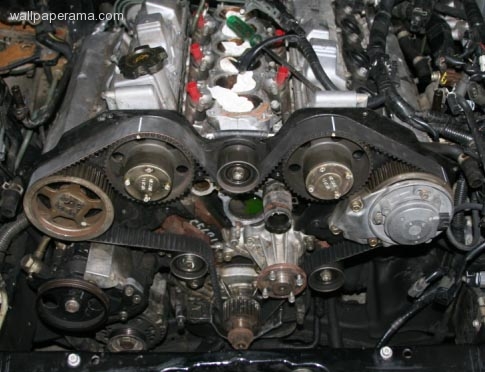
5. align all the DTC top dead center points.
now install a 10 MM bolt in the tensioner and make sure the tensioner is all the way in the closed position, the way you close it is with a big flat screw driver and use it as a lever to push it in.. WARNING: do it slowly, as you push, threat the screw in with your and until its all the way in, when it all closed, remove the bold from the tensioner and you can remove the old timing belt
now install the new timing belt and align the 4 white lines on the timing belt with the dtc marks on the gears
now that you have the timing belt installed, make sure to move the gears to the left <- (counterclock ) at least 20 degrees to allow the auto tensioner to put some tension to the timing bels, otherwise, you will install the timting belt all wrong and you will ruin your engine. so becaurful, if you have doubts dont continue. in fact, dont even try this until you read it first and you are confortable doing it.
i love you alice
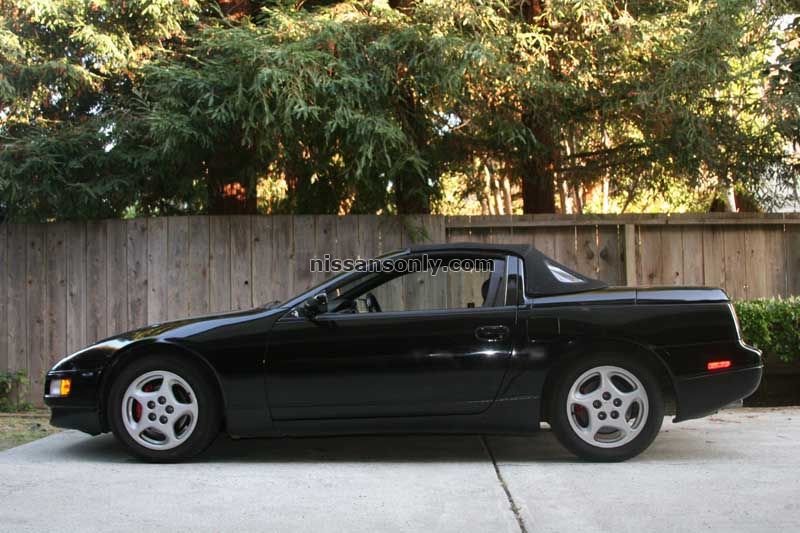
my car
if you dont know what you are doing, its best to leave it to the professionals, but if you know about cars you can follow this short tutorial..
1. remove fan cover and fan
2. remove alternator belt, power steering belt and ac belt
3. remove harmonic balancer
3. remove radiator hose
4. remove timing belt plastic covers, there are two at the top and one at the bottome.
now that you have remove all the above, your engine will look like this:
5. align all the DTC top dead center points.
now install a 10 MM bolt in the tensioner and make sure the tensioner is all the way in the closed position, the way you close it is with a big flat screw driver and use it as a lever to push it in.. WARNING: do it slowly, as you push, threat the screw in with your and until its all the way in, when it all closed, remove the bold from the tensioner and you can remove the old timing belt
now install the new timing belt and align the 4 white lines on the timing belt with the dtc marks on the gears
now that you have the timing belt installed, make sure to move the gears to the left <- (counterclock ) at least 20 degrees to allow the auto tensioner to put some tension to the timing bels, otherwise, you will install the timting belt all wrong and you will ruin your engine. so becaurful, if you have doubts dont continue. in fact, dont even try this until you read it first and you are confortable doing it.
i love you alice
my car
Gearhead
Sun Jul 06, 2008
this is a good thing to learn how to do, however, i wouldn't recommend the weekend mechanic try this, especially on their own car, dosn't take much to bend valves, and your missing the part about belt deflection. maybe you should teach people on a more basic vehicle like 4cyl single cam, alot more people could follow that with minimal effort. just a thought..
Related Content
- For Sale Really Nice Nissan 300zx Twin Turbo Z32 1996 Nice Car
- 1996 Nissan 300zx Bose Radio Cd Stereo Used For Sale Cheap
- 300zx Keyless Entry Remote Control Computer Module Location
- Sporty And Stylish New 300zx Front Bumper For Sale Rare Bumper
- How To Set Or Chage Timing Nissan 300zx With A Timing Gun
- 300zx Problem Engine Shuts Down When In Neutral
- How To Pass Smog Check Nissan 300zx Z32 - Car Preparation
- How To Remove A Motor Engine From A Nissan 300zx Car
- How To Install A Cat Back System Exhaust On 300zx Z32 Car
- Failed Smog Check Emissions Test California Nissan 300zx Co(ppm) Vir