How To Make My Computer Faster To Surf The Internet On Website For Dial Up Service
This Page Contains information about How To Make My Computer Faster To Surf The Internet On Website For Dial Up Service By carlito in category Windows Hosting with 1 Replies. [565], Last Updated: Tue Feb 07, 2023
carlito
Tue May 08, 2007
1 Comments
1611 Visits
have you noticed that most websites now are full featured, which means they have more pictures and more multimedia content. all this multimedia makes it tuff for people who have dialup to surf the internet. well, if you have dialup you can make your computer surf your pages faster.
if you are surfing the interent for information, this trick works great, but if you are surfing the internet for pictures on a dialup connection. this trick will not work.
ok, on your internet explorer brower click on tools, then internet options. a new window will pop-up
then click on the "settings" button, another window will open.
on "check for newer versions of stored pages" select never the Click on the OK button and again on the OK button to close all the window popus you have opened.
now when you browse the internet, the content your browser already downloaded to your computer will not be downloaded again and it will be faster.
there's another trick you can configure internet explorer so that only text is shown, leaving all the multimedia stuff out. often, i search the web looking for information. most information i am looking for is on text, so i don't care much for the pictures. so to show text only on all the pages you visit you can do this and it will make your surfing faster.
again, click on tools, then on internet options , then click on the "advance" tab at the top right of the popup window.
scroll down until you see the "multimedia" and make sure the following ARE NOT SELECTED:
Play animations in web pages
Play sounds in web pages
Show image download placeholders
Show pictures
Smart image dithering
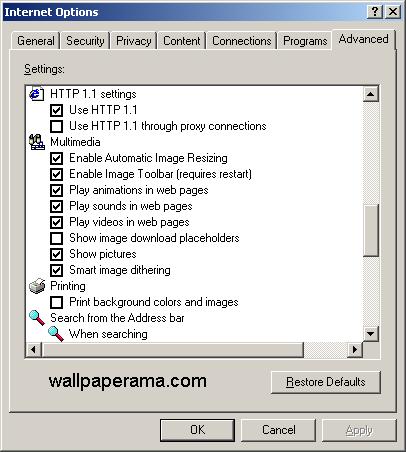
after you have UNSELECTED the above options, click OK and then OK again to close all the popups. now when you visit webpages, only the text will be shown on your browser, and the browser will not download the images and it will load your pages faster.
if you are surfing the interent for information, this trick works great, but if you are surfing the internet for pictures on a dialup connection. this trick will not work.
ok, on your internet explorer brower click on tools, then internet options. a new window will pop-up
then click on the "settings" button, another window will open.
on "check for newer versions of stored pages" select never the Click on the OK button and again on the OK button to close all the window popus you have opened.
now when you browse the internet, the content your browser already downloaded to your computer will not be downloaded again and it will be faster.
there's another trick you can configure internet explorer so that only text is shown, leaving all the multimedia stuff out. often, i search the web looking for information. most information i am looking for is on text, so i don't care much for the pictures. so to show text only on all the pages you visit you can do this and it will make your surfing faster.
again, click on tools, then on internet options , then click on the "advance" tab at the top right of the popup window.
scroll down until you see the "multimedia" and make sure the following ARE NOT SELECTED:
Play animations in web pages
Play sounds in web pages
Show image download placeholders
Show pictures
Smart image dithering
after you have UNSELECTED the above options, click OK and then OK again to close all the popups. now when you visit webpages, only the text will be shown on your browser, and the browser will not download the images and it will load your pages faster.
Bob
Sat Jun 25, 2011
Thankyou, I have Mozilla, and every time I try to go to POGO, I get a POGO to slow, connection timed out. I am at the point of giving up on computers, and go to gamebox. I either get a connection to slow, or lcvookies, or cache, or anything but where I want to go. I have tried everything. Here is my Ph: no:2285883095, if you'll call me, we can walk through all of this with me on the co0mputer. Let it ring 2 times, hangup and I'll call back. I have listened to 30 different people, with 30 different ideas. All I'm asking for is some help fixing this (Blank) computer. Please help me. I have AVG PC Tuneup, Ad-Aware, Spybot, and thats all. ThankU, Bob Peterson