How To Insert Data Into Mysql Db Using Form In Php Database Enter Code
this page will show you exactly step by step on how to insert data in your mysql database using php script very simple you can test for yourself and very easy to follow and many positive comments from visitors [870], Last Updated: Tue Feb 07, 2023
wallpaperama
Mon Feb 19, 2007
53 Comments
66690 Visits
ok, when i started to learn about php, i wanted to know how i can put that data from a HTML form into mysql database. it wasn't easy to lear because there was so much stuff i need to know. so to help you, make sure you have these things so you will be able to learn my tutorial here on how to insert data into mysql from a PHP web form.
1. Knowledge of HTML (average knowledge)
2. Knowldege of PHP (average knowledge)
3. Knowledge of Mysql (average knowledge)
4. Have a website with PHP (if you don't have a PHP/mysql website, visit our friends at www.webune.com and signup for a PHP/mysql web hosting plan)
now that you have at least all the four points above, its time to show you how you can insert the data.
ok, i will give you a short tutorial...
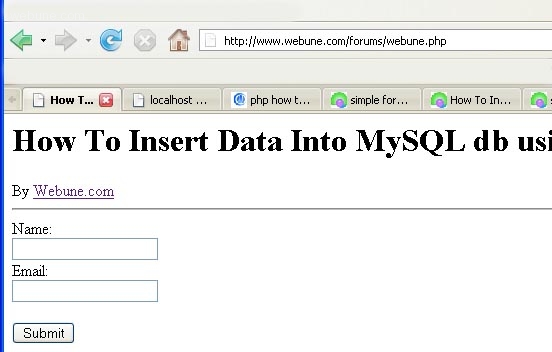
In this example, lets say i want to collect data from a user. For the purpose of this tutorial guide, i only need the user's name and their email address. so i only need two text fields. one is user_name and the second one is user_email. so this is how the form would look like in HTML:
this is how the form will look like:
FORM HTMLCODE
the next step would be to have php check if the form has been submited or not. if the form has been submitted..
the way you can tell if a form has been submitted is to check if our submit button has a value.. if you look closely in our form html. i have this
HTML CODE
as you can see, the name of the submit button is called "Submit" so that the string variable name we can find out if its true or false. to check if the form is submitted i will use the if else operator in php
PHP CODE
ok, on step three, you will need to have the following information, if you dont have this information,,, you will not be able to continue on with this tutorial
if you dont have all these requirements contact you webhosting company.
if you are a Webune customer, contact us and we will be glad to provide this information for you.
the next step involves in us creating some tables in the mysql database.
so login to your database using phpmyadmin. if you are a webune customer, login to the control panel and click on the phpmyadmin link, you will need to login to the database in step 3.
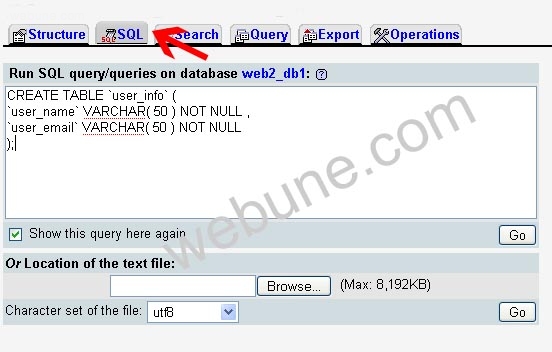
once you are in phpmyadmin click on the SQL tab and copy and past this sql dump into the text area:
this will create a table called user_info in your database, this is where we will enter the information from the form. as you can see, we created two fields, one called user_name and the other one called user_email
its should look something like this on your phpmyadmin
now its time to put the whole thing together.. we wrote up this simple script to show you how you can add. we made this script simple so that you can hack it, modify it or do whatever you want with it so you can practice and how how it all works. one this we ask is that please dont remove the www.webune.com link - we would appreciate it if you dont.
so open your favorite text editor. if you have windows like i do, im using windows xp, open a blank notepad and copy and paste the following php code into it:
webune.php
Now make sure to change the mysql connections settings. so for example, i have these settings. NOTE: this are fake, so make sure to change them, otherwise, this script will error out because it cant connect to the database.
$hostname = "localhost";
$db_user = "webune_user";
$db_password = "mypassword";
$database = "database";
$db_table = "user_info";
as you can see on my example, my hostname is localhost
my database username is webune_user
the password for my database is mypassword my database is database
and my database table is user_info
so now that you have changed these setting to your database credentials, save the notepad file as webune.php
now upload to your php website and open it with your browser, enter the information and once you get a sucess message, the information was entered into the datase.
i tested and it works. if you are a webune customer, you should not have any problems, since this test is done on our servers
here is how the form looks like in my firefox browser when i open webune.php
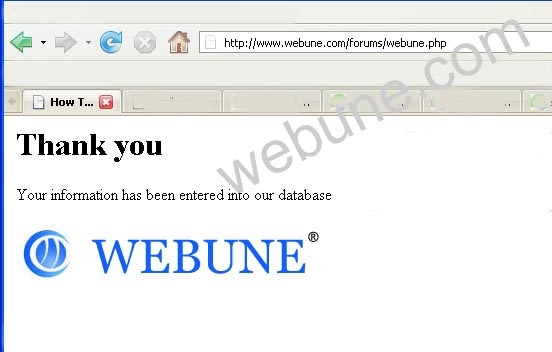
and when i submit the form with my name and email address i get this
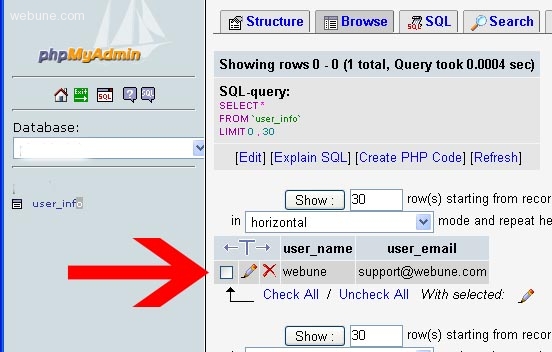
now when i go to my phpmyadmin, i can confirm that the information i've entered on the form, was inserted into my database
NOTE: you should not by any means deploy this code in a real production website, as there are many security issues, like sql injection. the purpose of this tutorial is to give you an idea on how the process of getting information from your users and storing it in a database so you can later diplay it or use it with your web applications. if you are not sure what i mean by slq injection, you can find lots of resources on this website or google it and you will find. for example you can google this string:
How To Avoid And Prevent Sql Injection mysql_real_escape_string wallpaperama
done..
i hope this helps you
remember if you need php web hosting
webune has the right service for you
UPDATE:::
today we created a video following these steps and how it works for beginners:
UPDATE 2-19-2012 = I know some of you have criticize me because my grammar is not so good. I must apologize, English is my second language, but i am trying very hard to share what i know with everyone from around the world and English and Spanish are the most spoken languages spoken in the free world. so i wrote this tutorial in Spanish and in English. I am from the country of El Salvador. Our national language is Spanish, so i hope you understand. :)
1. Knowledge of HTML (average knowledge)
2. Knowldege of PHP (average knowledge)
3. Knowledge of Mysql (average knowledge)
4. Have a website with PHP (if you don't have a PHP/mysql website, visit our friends at www.webune.com and signup for a PHP/mysql web hosting plan)
now that you have at least all the four points above, its time to show you how you can insert the data.
Step 1
ok, i will give you a short tutorial...
In this example, lets say i want to collect data from a user. For the purpose of this tutorial guide, i only need the user's name and their email address. so i only need two text fields. one is user_name and the second one is user_email. so this is how the form would look like in HTML:
this is how the form will look like:
FORM HTMLCODE
<form method="post" action="">
Name:<br>
<input type="text" name="user_name">
<br>
Email: <br>
<input type="text" name="user_email">
<br><br>
<input type="submit" name="Submit" value="Submit">
</form>
Name:<br>
<input type="text" name="user_name">
<br>
Email: <br>
<input type="text" name="user_email">
<br><br>
<input type="submit" name="Submit" value="Submit">
</form>
STEP 2
the next step would be to have php check if the form has been submited or not. if the form has been submitted..
the way you can tell if a form has been submitted is to check if our submit button has a value.. if you look closely in our form html. i have this
HTML CODE
<input type="submit" name="Submit" value="Submit">
as you can see, the name of the submit button is called "Submit" so that the string variable name we can find out if its true or false. to check if the form is submitted i will use the if else operator in php
PHP CODE
if (isset($_REQUEST['Submit'])) {
// INSERT DATA FROM FORM ONCE THE FORM HAS BEEN SUBMITTED
} else {
// DISPLAY FORM IF FORM HAS NOT BEEN SUBMITTED
}
// INSERT DATA FROM FORM ONCE THE FORM HAS BEEN SUBMITTED
} else {
// DISPLAY FORM IF FORM HAS NOT BEEN SUBMITTED
}
Step 3
ok, on step three, you will need to have the following information, if you dont have this information,,, you will not be able to continue on with this tutorial
- hostname (usually localhost)
- database user name (if you don't have this contact your host company)
- database user password (if you don't have this contact your host company)
- database name (if you don't have this contact your host company)
- database table name (you create this. you can create a table in phpmyadmin)
if you dont have all these requirements contact you webhosting company.
if you are a Webune customer, contact us and we will be glad to provide this information for you.
Step 4
the next step involves in us creating some tables in the mysql database.
so login to your database using phpmyadmin. if you are a webune customer, login to the control panel and click on the phpmyadmin link, you will need to login to the database in step 3.
once you are in phpmyadmin click on the SQL tab and copy and past this sql dump into the text area:
CREATE TABLE `user_info` (
`user_name` VARCHAR( 50 ) NOT NULL ,
`user_email` VARCHAR( 50 ) NOT NULL
);
`user_name` VARCHAR( 50 ) NOT NULL ,
`user_email` VARCHAR( 50 ) NOT NULL
);
this will create a table called user_info in your database, this is where we will enter the information from the form. as you can see, we created two fields, one called user_name and the other one called user_email
its should look something like this on your phpmyadmin
now its time to put the whole thing together.. we wrote up this simple script to show you how you can add. we made this script simple so that you can hack it, modify it or do whatever you want with it so you can practice and how how it all works. one this we ask is that please dont remove the www.webune.com link - we would appreciate it if you dont.
so open your favorite text editor. if you have windows like i do, im using windows xp, open a blank notepad and copy and paste the following php code into it:
webune.php
<?php
####################################################################
# THIS SCRIPT CREATED BY WWW.WEBUNE.COM
# PLEASE DONT ERASE THIS
###################################################################
####################################################################
################ DATABASE CONFIGURE ##############################
####################################################################
$hostname = "localhost"; // usually is localhost, but if not sure, check with your hosting company, if you are with webune leave as localhost
$db_user = "username"; // change to your database password
$db_password = "passwd"; // change to your database password
$database = "databse"; // provide your database name
$db_table = "user_info"; // leave this as is
# STOP HERE
####################################################################
# THIS CODE IS USED TO CONNECT TO THE MYSQL DATABASE
$db = mysql_connect($hostname, $db_user, $db_password);
mysql_select_db($database,$db);
?>
<html>
<head>
<title>How To Insert Data Into MySQL db using form in php</title>
</head>
<body>
<?php
if (isset($_REQUEST['Submit'])) {
# THIS CODE TELL MYSQL TO INSERT THE DATA FROM THE FORM INTO YOUR MYSQL TABLE
$sql = "INSERT INTO $db_table(user_name,user_email) values ('".mysql_real_escape_string(stripslashes($_REQUEST['user_name']))."','".mysql_real_escape_string(stripslashes($_REQUEST['user_email']))."')";
if($result = mysql_query($sql ,$db)) {
echo '<h1>Thank you</h1>Your information has been entered into our database<br><br><img src="http://www.webune.com/images/headers/default_logo.jpg"';
} else {
echo "ERROR: ".mysql_error();
}
} else {
?>
<h1>How To Insert Data Into MySQL db using form in php</h1>By <a href="http://www.webune.com">Webune.com</a><hr>
<form method="post" action="">
Name:<br>
<input type="text" name="user_name">
<br>
Email: <br>
<input type="text" name="user_email">
<br><br>
<input type="submit" name="Submit" value="Submit">
</form>
<?php
}
?>
</body>
</html>
####################################################################
# THIS SCRIPT CREATED BY WWW.WEBUNE.COM
# PLEASE DONT ERASE THIS
###################################################################
####################################################################
################ DATABASE CONFIGURE ##############################
####################################################################
$hostname = "localhost"; // usually is localhost, but if not sure, check with your hosting company, if you are with webune leave as localhost
$db_user = "username"; // change to your database password
$db_password = "passwd"; // change to your database password
$database = "databse"; // provide your database name
$db_table = "user_info"; // leave this as is
# STOP HERE
####################################################################
# THIS CODE IS USED TO CONNECT TO THE MYSQL DATABASE
$db = mysql_connect($hostname, $db_user, $db_password);
mysql_select_db($database,$db);
?>
<html>
<head>
<title>How To Insert Data Into MySQL db using form in php</title>
</head>
<body>
<?php
if (isset($_REQUEST['Submit'])) {
# THIS CODE TELL MYSQL TO INSERT THE DATA FROM THE FORM INTO YOUR MYSQL TABLE
$sql = "INSERT INTO $db_table(user_name,user_email) values ('".mysql_real_escape_string(stripslashes($_REQUEST['user_name']))."','".mysql_real_escape_string(stripslashes($_REQUEST['user_email']))."')";
if($result = mysql_query($sql ,$db)) {
echo '<h1>Thank you</h1>Your information has been entered into our database<br><br><img src="http://www.webune.com/images/headers/default_logo.jpg"';
} else {
echo "ERROR: ".mysql_error();
}
} else {
?>
<h1>How To Insert Data Into MySQL db using form in php</h1>By <a href="http://www.webune.com">Webune.com</a><hr>
<form method="post" action="">
Name:<br>
<input type="text" name="user_name">
<br>
Email: <br>
<input type="text" name="user_email">
<br><br>
<input type="submit" name="Submit" value="Submit">
</form>
<?php
}
?>
</body>
</html>
Now make sure to change the mysql connections settings. so for example, i have these settings. NOTE: this are fake, so make sure to change them, otherwise, this script will error out because it cant connect to the database.
$hostname = "localhost";
$db_user = "webune_user";
$db_password = "mypassword";
$database = "database";
$db_table = "user_info";
as you can see on my example, my hostname is localhost
my database username is webune_user
the password for my database is mypassword my database is database
and my database table is user_info
so now that you have changed these setting to your database credentials, save the notepad file as webune.php
now upload to your php website and open it with your browser, enter the information and once you get a sucess message, the information was entered into the datase.
i tested and it works. if you are a webune customer, you should not have any problems, since this test is done on our servers
here is how the form looks like in my firefox browser when i open webune.php
and when i submit the form with my name and email address i get this
now when i go to my phpmyadmin, i can confirm that the information i've entered on the form, was inserted into my database
NOTE: you should not by any means deploy this code in a real production website, as there are many security issues, like sql injection. the purpose of this tutorial is to give you an idea on how the process of getting information from your users and storing it in a database so you can later diplay it or use it with your web applications. if you are not sure what i mean by slq injection, you can find lots of resources on this website or google it and you will find. for example you can google this string:
How To Avoid And Prevent Sql Injection mysql_real_escape_string wallpaperama
done..
i hope this helps you
remember if you need php web hosting
webune has the right service for you
UPDATE:::
today we created a video following these steps and how it works for beginners:
UPDATE 2-19-2012 = I know some of you have criticize me because my grammar is not so good. I must apologize, English is my second language, but i am trying very hard to share what i know with everyone from around the world and English and Spanish are the most spoken languages spoken in the free world. so i wrote this tutorial in Spanish and in English. I am from the country of El Salvador. Our national language is Spanish, so i hope you understand. :)
waqas
Fri Apr 06, 2012
waqas
here iz a very easy and more efficient guide for u guyz
plz visit w-a-q-a-s-u-o-w remove all the (-) from ths URL nd opn it.thnx
waqas
Sun Mar 18, 2012

hey guyz here iz a better solution of this problem plz visit my personal site
waq

Tarus
Mon Aug 29, 2011

This is a great page, everything worked perfectly. How about the code for retrieving data from mysql database? Thanks once gain, it made my day.
https://www.wallpaperama.com/forums/how-to-insert-data-into-mysql-db-using-form-in-php-database-enter-code-t868.html
https://www.wallpaperama.com/forums/how-to-insert-data-into-mysql-db-using-form-in-php-database-enter-code-t868.html
Asiimwe
Tue Jul 19, 2011

Lots of Thanks to the guy who designed this stuff....it sure does work