How To Fix Samsung Blackjack Cell Phone Keys Stuck
Post Description:
Post Tags: how, to, fix, samsung, blackjack, cell, phone, keys, stuck, tutorial, guides, howto, teach, learn, computer, programming, support
This Post Has Been Viewed 1987 Times Since Sat Jan 19, 2008 7:40 pm Posted By black jack with 13 replies
Post Description:
Post Tags: how, to, fix, samsung, blackjack, cell, phone, keys, stuck, tutorial, guides, howto, teach, learn, computer, programming, support
This Post Has Been Viewed 1987 Times Since Sat Jan 19, 2008 7:40 pm Posted By black jack with 13 replies
| How To Fix Samsung Blackjack Cell Phone Keys Stuck |
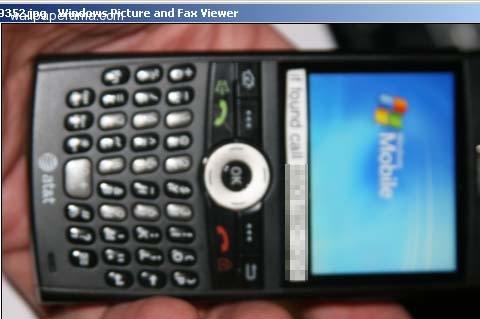
i have a samsung blackjack cellphone i got with at&t, ive been using it for a while, and the keys on my keyboard are getting hard. it very difficult to press down on them. i think i might have spilled something like soda or something with sugar on it. i tried wiping it with web paper towel but that didnt work, so now im gonna have to take this sucker apart to clean the whole key pad
Leave Your Comments
Share
URL:
You can use this HTML code to put it on your website to show your friends this wallpaper. Use this code on your profile like myspace, friendster, Facebook or others. Just Copy and Paste it in your HTML on your websites Fourms BBCODE:
BBCODE is use on forums. You can put this code on all your BBCODE enabled forums like PhpBB, vBulletin® and others. Just Copy and Paste this code on your Posts and Replies on your forums
|
Comments and replies About How To Fix Samsung Blackjack Cell Phone Keys Stuck
:: 1 :: Reply #37247 Reply By blackjack On Sat Jan 19, 2008 7:46 pm

ok first remove the back cover
:: 2 :: Reply #37249 Reply By blackjack On Sat Jan 19, 2008 7:49 pm

now remove the battery
:: 3 :: Reply #37250 Reply By blackjack On Sat Jan 19, 2008 7:51 pm

now remove the att cellphone card
:: 4 :: Reply #37253 Reply By blackjack On Sat Jan 19, 2008 7:57 pm

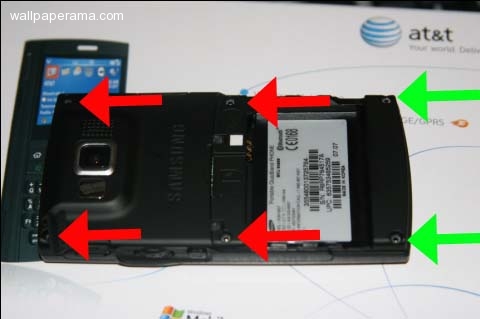
now remove the six screws holding the back plastic cover.
note: the green arrows, you're going to have to use a paperclip to remove the rubber stoppers inside the little holes where the screws are to be able to remove the screws
:: 5 :: Reply #37255 Reply By blackjack repair On Sat Jan 19, 2008 8:06 pm

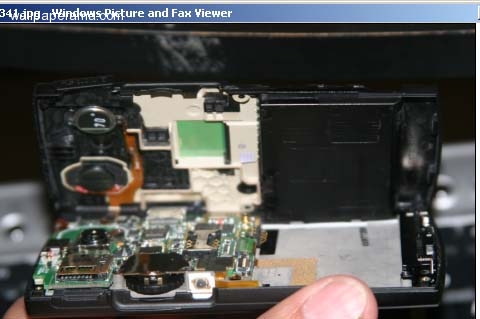
once you have removed all six screws, open the covers very gently, be careful because the side buttons will become loose and they may drop easity
:: 6 :: Reply #37257 Reply By keypad On Sat Jan 19, 2008 8:08 pm

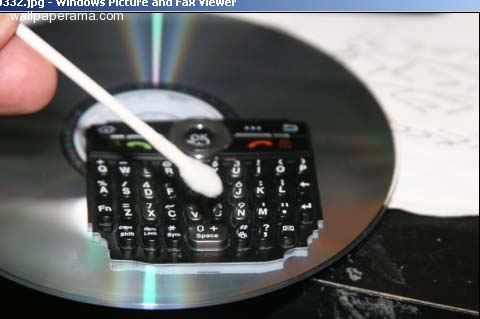
now that i have the cellphone apart, i can clean my sticky keypad
:: 7 :: Reply #37258 Reply By black jack cell phone On Sat Jan 19, 2008 8:10 pm

once i have it cleaned, i put it back together, and test it. after i cleaned it, it worked. now my keys dont stick
:: 8 :: Reply #50159 Reply By AbbaliCiouS On Mon Apr 14, 2008 5:40 pm
this is exactly what i have been looking for as a solution to the exact same problem! (even though i have a different kind of phone i think it will work all the same) good call thanks :)
:: 9 :: Reply #50406 Reply By thao On Wed Apr 16, 2008 1:03 pm
how do you fix the screen if it go blank?
:: 10 :: Reply #53632 Reply By chad On Tue May 13, 2008 8:12 am
what kind of screw driver do u use?
:: 11 :: Reply #53641 Reply By blackjack On Tue May 13, 2008 9:15 am
you use a small phillips screw driver
:: 12 :: Reply #64031 Reply By jack On Wed Jul 30, 2008 12:10 pm
my cell phone keys not work samsung
:: 13 :: Reply #71095 Reply By Dennis Madrid On Thu Sep 18, 2008 5:39 pm
i also have the new samsung blackjack, and my middle button where u push to where the circle is. keeps getting stuck and ive sent my phone 4 times to get one in return but the ones i keep getting are ones that have been refurbished.
what can do to fix this problem,
thanks, dennis madrid
what can do to fix this problem,
thanks, dennis madrid