How To Fix ODFaq MYSQL Installation Errors Database Admin Login Password
This Page Contains information about How To Fix ODFaq MYSQL Installation Errors Database Admin Login Password By wallpaperama in category Scripts with 17 Replies. [1315], Last Updated: Tue Feb 07, 2023
wallpaperama
Thu Mar 29, 2007
17 Comments
2500 Visits
one of my favorites scripts is call ODFaq by oodie.com. What is ODFaq? accroding to oodie.com: its a PHP application that allows you to manage frequently asked questions. You can create/edit/delete entries using user-friendly web based interface. The only problem i had with the installation were two. one with the database and the other one with the default admin login and password.
- MYSQL ERRROR -
1. the mysql error:
Illegal mix of collations (utf8_general_ci,IMPLICIT) and (latin1_swedish_ci,COERCIBLE) for operation 'ifnull'
To fix this problem these are the steps i took to fix.
1. login to mysql using phpmyadmin
2. DELETE THE CURRENT NEWLY INSTALLED DATABASE by clicking on the "Drop" tab in phpmyadmin panel. will look the picture below:

3. now create a new database, lets call it "odfaq" or whatever you want, im going to name the new database as "odfaq", IMPORTANT: now on the collation drop down menu, make sure to select latin_swedish_ci
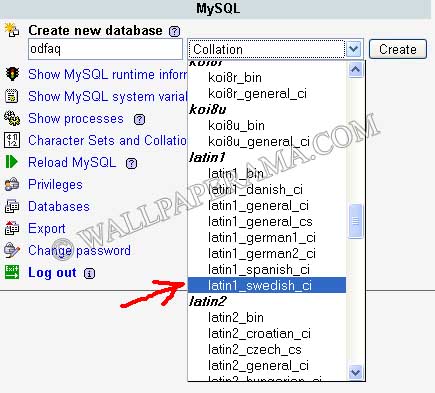
4. now dump the database.sql included in the script and try opening the script again with your browser, this time you should not get this error:
Illegal mix of collations (utf8_general_ci,IMPLICIT) and (latin1_swedish_ci,COERCIBLE) for operation 'ifnull'
- NOW THE ADMIN ERROR -
now that you have corrected the database error, you go to the admin directory and you try to login as "admin" and "admin" for password but it doesn't work. According to the install.html file, these are the defaults. but they don't work.
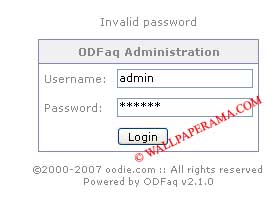
When i look at the admin password in myphpadmin, its encrypted, so i need to change it. this is how you change it:
1. go to the odfaq_user table in your myphpadmin panel. you will notice that the default password is set to "43e9a4ab75570f5b" but who knows what that is, since its encrypted, i have no idea what it is. so take the next step to reset the password.
2. click on the edit button (the one that looks like a pencil)
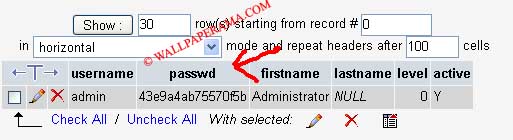
3. when you click on the edit button, you can edit the fields. edit the following fields:
for Function select: PASSWORD
for Value enter: password
It should look like something like the image (picture) below:
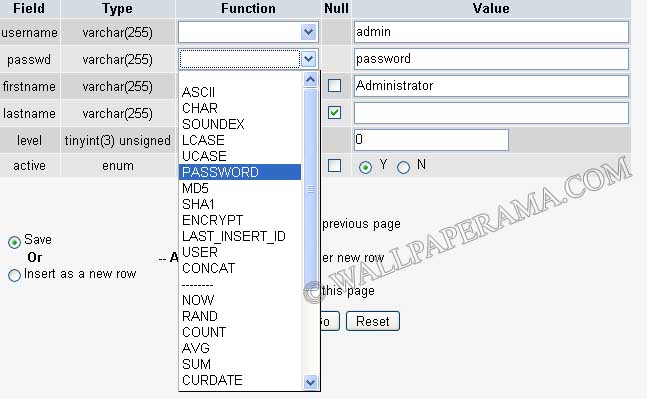
now hit submit for the changes to take affect. you will notice that the password field is now encrypted by it has the following password:
*2470C0C06DEE42FD1618BB99005ADCA2EC9D1E19
Now try to login to the admin section with
username: admin
password: password
SUCCESS!!
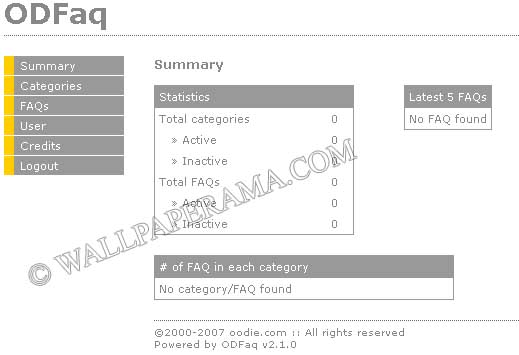
Thats it. hope it helps. Please provide any comments to suggestions. Thanks.
- MYSQL ERRROR -
1. the mysql error:
Illegal mix of collations (utf8_general_ci,IMPLICIT) and (latin1_swedish_ci,COERCIBLE) for operation 'ifnull'
To fix this problem these are the steps i took to fix.
1. login to mysql using phpmyadmin
2. DELETE THE CURRENT NEWLY INSTALLED DATABASE by clicking on the "Drop" tab in phpmyadmin panel. will look the picture below:
3. now create a new database, lets call it "odfaq" or whatever you want, im going to name the new database as "odfaq", IMPORTANT: now on the collation drop down menu, make sure to select latin_swedish_ci
4. now dump the database.sql included in the script and try opening the script again with your browser, this time you should not get this error:
Illegal mix of collations (utf8_general_ci,IMPLICIT) and (latin1_swedish_ci,COERCIBLE) for operation 'ifnull'
- NOW THE ADMIN ERROR -
now that you have corrected the database error, you go to the admin directory and you try to login as "admin" and "admin" for password but it doesn't work. According to the install.html file, these are the defaults. but they don't work.
When i look at the admin password in myphpadmin, its encrypted, so i need to change it. this is how you change it:
1. go to the odfaq_user table in your myphpadmin panel. you will notice that the default password is set to "43e9a4ab75570f5b" but who knows what that is, since its encrypted, i have no idea what it is. so take the next step to reset the password.
2. click on the edit button (the one that looks like a pencil)
3. when you click on the edit button, you can edit the fields. edit the following fields:
for Function select: PASSWORD
for Value enter: password
It should look like something like the image (picture) below:
now hit submit for the changes to take affect. you will notice that the password field is now encrypted by it has the following password:
*2470C0C06DEE42FD1618BB99005ADCA2EC9D1E19
Now try to login to the admin section with
username: admin
password: password
SUCCESS!!
Thats it. hope it helps. Please provide any comments to suggestions. Thanks.
Mum
Sat Jan 21, 2012
Thanks, wery...wery much, I did not have MyAdmin, but I solvde my problems anyway (zorry my English)
creado.pl
Tue Oct 11, 2011
Now I know. Big thanks, really helpfull.
Jax
Sat Jan 01, 2011
You're so nice... It's work
Thank you so much...
https://www.wallpaperama.com/forums/how-to-fix-odfaq-mysql-installation-errors-database-admin-login-password-t1002.html
https://www.wallpaperama.com/forums/how-to-fix-odfaq-mysql-installation-errors-database-admin-login-password-t1002.html
Maarten
Sat Mar 13, 2010
Thanks a lot! I couldn't solve the admin password error myself...(didn't no the password function in phpmyadmin). Works all great now!
Janice
Tue Feb 23, 2010
I can't thank you enough. I like ODFaq but there's no troubleshooting info for it at all.