How To Detect If User Javascript Is Enabled PHP HTML Script Code Sample
i will show you how to detect if a visitor on your website has javascript enabled or no. in this forums page, i wrote it because i needed to know if my vivistors where using javasript or not [778], Last Updated: Tue Feb 07, 2023
braker
Wed Nov 22, 2006
12 Comments
16548 Visits
As a web designer you must must know how to make browsing easier for your clients or visitors. Some visitors disable their javascripting in their browser, so when you design a site, you must take this into consideration.
Fortunately, there is a way for webmaster, admin and designers to check if the user's browser has their javascript enabled.
In this little step-by-step tutorial guide, i will show you how to find if the user has their javascritp scripting enabled. In my examle I have a form and in order for the form to work correctly, the user has to have theri javascript enabled, otherwise, the form will not work correclty, so here it is..
1. the first step is to open your favorite text editor. I recommend you use notepad if you are using windows:
2. Once you have notepad opened, copy and paste the following code into the notepad:
3. Now save this notepad document as: "wallpaperama-javascript.html" Make sure you put the quotes when saving the file, some versions of windows will save it as wallpaperama-javascript.htm.txt if you don't put the quotes in between the file name.
4. Now that you have the file saved, you can open it with your favorite browser:
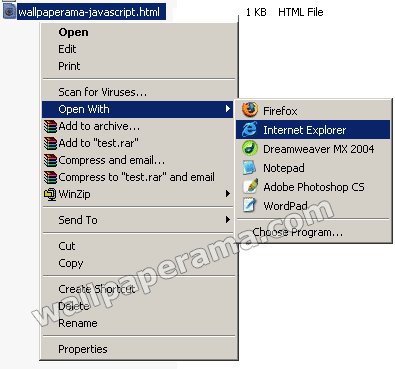
5. DONE - Depending on your browser, if you have javascript enabled or not, it will display a message telling you whether or not you have javascript enabled in your browser.
if you want to know how to enabled or disabled javascript in your browser, visit these posts.
http://www.wallpaperama.com/forums/show-me-how-to-enable-javascript-in-firefox-browser-t43.html - for Firefox
http://www.wallpaperama.com/disp-post64.html - for Internet Explorer
Fortunately, there is a way for webmaster, admin and designers to check if the user's browser has their javascript enabled.
In this little step-by-step tutorial guide, i will show you how to find if the user has their javascritp scripting enabled. In my examle I have a form and in order for the form to work correctly, the user has to have theri javascript enabled, otherwise, the form will not work correclty, so here it is..
1. the first step is to open your favorite text editor. I recommend you use notepad if you are using windows:
2. Once you have notepad opened, copy and paste the following code into the notepad:
CODE:
<!DOCTYPE HTML PUBLIC "-//W3C//DTD HTML 4.01 Transitional//EN" "http://www.w3.org/TR/html4/loose.dtd">
<html>
<head>
<title>How To Detect If User Javascript Is Enabled by Wallpaperama.com</title>
<meta http-equiv="Content-Type" content="text/html; charset=iso-8859-1">
<style type="text/css">
<!--
.style1 {
color: #FF0000;
font-weight: bold;
}
-->
</style>
</head>
<body>
<p>The Purpose of this script is to show if you have javascript enabled in your browser.</p>
<p class="style1">
<script type="text/javascript">
document.write('Javascript is enabled');
</script>
<noscript>
Javascript is disabled
</noscript>
</p>
<a href="http://www.wallpaperama.com/forums/how-to-detect-if-user-javascript-is-enabled-php-html-script-code-sample-t493.html"><< Go Back</a><p align="center">Script By <a href="http://www.wallpaperama.com">Wallpaperama.com</a></p>
</body>
</html>
<html>
<head>
<title>How To Detect If User Javascript Is Enabled by Wallpaperama.com</title>
<meta http-equiv="Content-Type" content="text/html; charset=iso-8859-1">
<style type="text/css">
<!--
.style1 {
color: #FF0000;
font-weight: bold;
}
-->
</style>
</head>
<body>
<p>The Purpose of this script is to show if you have javascript enabled in your browser.</p>
<p class="style1">
<script type="text/javascript">
document.write('Javascript is enabled');
</script>
<noscript>
Javascript is disabled
</noscript>
</p>
<a href="http://www.wallpaperama.com/forums/how-to-detect-if-user-javascript-is-enabled-php-html-script-code-sample-t493.html"><< Go Back</a><p align="center">Script By <a href="http://www.wallpaperama.com">Wallpaperama.com</a></p>
</body>
</html>
3. Now save this notepad document as: "wallpaperama-javascript.html" Make sure you put the quotes when saving the file, some versions of windows will save it as wallpaperama-javascript.htm.txt if you don't put the quotes in between the file name.
4. Now that you have the file saved, you can open it with your favorite browser:
5. DONE - Depending on your browser, if you have javascript enabled or not, it will display a message telling you whether or not you have javascript enabled in your browser.
if you want to know how to enabled or disabled javascript in your browser, visit these posts.
http://www.wallpaperama.com/forums/show-me-how-to-enable-javascript-in-firefox-browser-t43.html - for Firefox
http://www.wallpaperama.com/disp-post64.html - for Internet Explorer
Cristi
Sun Aug 30, 2009
nILL
Sun May 13, 2012
Its really good......... thanx man
Abeera
Sun Mar 25, 2012
its really fine, thanks ysapak for helping us
https://www.wallpaperama.com/forums/how-to-detect-if-user-javascript-is-enabled-php-html-script-code-sample-t493.html
https://www.wallpaperama.com/forums/how-to-detect-if-user-javascript-is-enabled-php-html-script-code-sample-t493.html
Abhijit
Fri Feb 05, 2010
thnks..........it's great. Now i can use this for websites to inform those dumb out there who have javascript disabled.
marc
Thu Jan 28, 2010
Cristi, that'd be because your piece of code doesn't work on IE, at least not on IE7. It will redirect you to the non javascript page no matter whether you have it enabled or not.
<noscript>
<meta http-equiv="refresh" content="0; url= yor_site.tdl/nojavascript.html" />
</noscript>
you don't need to post or do any other javascript testing. it's very simple!