How To Backup Cisco Pix Firewall Configuration File
This Page Contains information about How To Backup Cisco Pix Firewall Configuration File By wallpaperama in category Tutorial And Guides with 1 Replies. [1485], Last Updated: Tue Feb 07, 2023
wallpaperama
Fri Jan 09, 2009
1 Comments
1643 Visits
if you have a cisco pix firewall you and you are wanting to know how you can backup your configuration file through a TFTP Server i will show you how.
first you need to have FTFP server installed, if you dont go to this link:
http://www.wallpaperama.com/forums/installing-tftp-server-in-linux-tutorial-t6965.html
Step 1. now that know you have TFTP server installed, lets start by login in to your firewall, once you are logged in,
- click on the Configuration Button at the top
- Under the Administration Category, select TFTP Server
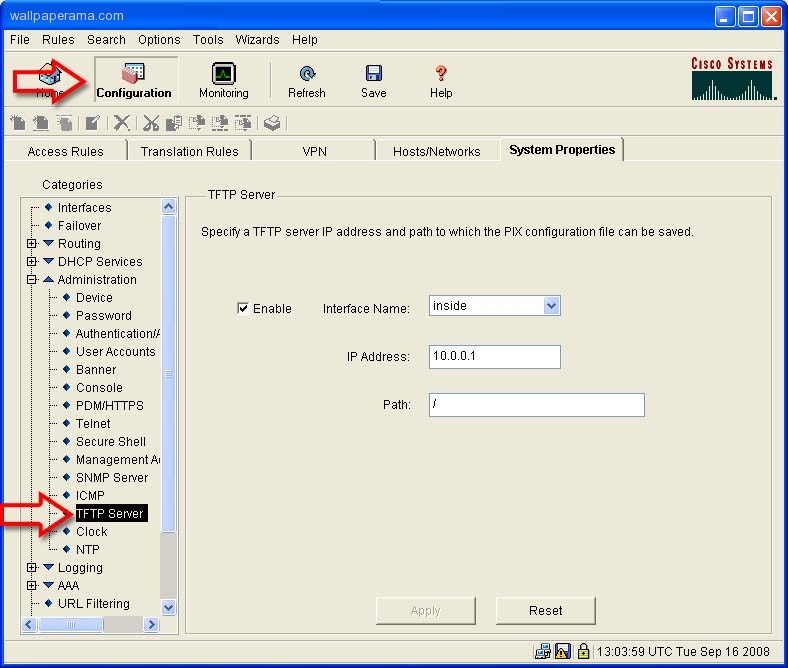
- Select Enable
- Interface Name: Here you have to two choices, Inside and Outside.
.. = Inside - Select inside if your TFTP server is within your network
.. = Outside - Select Outside if you want to save the configurations to a server outside your network, like on the internet
- IP Address: Enter the Ip address of your TFTP server. Since my TFTP server is inside my network and I am using NAT, i will provide the NAT Ip of my server.
Path: Here I put the root directory of my server / means root which on the server is /tftpboot/
Step 2. Click Apply
Step 3. login to your server using ssh and send this command:
Step 4. thre firewall will need to have write access to the back file so set the permissions:
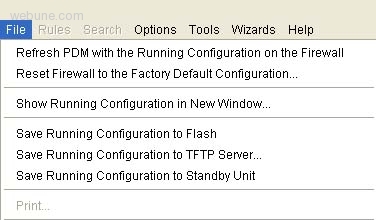
Step 5. now that you have your TFTP server configured in your firewall, you can save your configuration. Just go to File, Save Running Configuration To TFTP Server
Step 6. Now you will see a Save Running Configuration to TFTP Server window
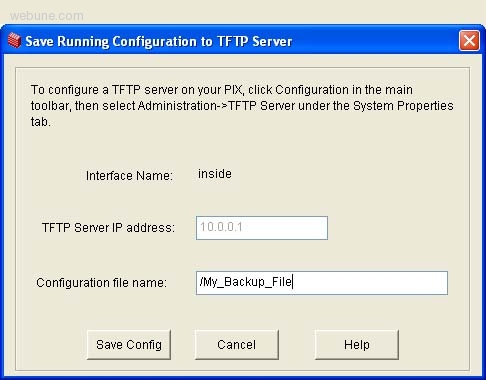
SET THESE OPTIONS:
- Interface Name = Inside
- TFTP Server Ip Address = xxx.xxx.xxx.xxx (whatever you insternal server is)
- Configuration File Name = /My_Backup_File (include the / slash)
- Click Save Config
Step 7. after the file has been transfered and saved in your TFTP server, you can view the configurations file by going to your TFTP server and view the file, i use this command:
next time your firewall crashes or your files become corrupted, or if you messed up, you can always configure it back to the way it was. its always a good idea to backup you firewall. you never know when you are going to need them
DONE
first you need to have FTFP server installed, if you dont go to this link:
http://www.wallpaperama.com/forums/installing-tftp-server-in-linux-tutorial-t6965.html
Step 1. now that know you have TFTP server installed, lets start by login in to your firewall, once you are logged in,
- click on the Configuration Button at the top
- Under the Administration Category, select TFTP Server
- Select Enable
- Interface Name: Here you have to two choices, Inside and Outside.
.. = Inside - Select inside if your TFTP server is within your network
.. = Outside - Select Outside if you want to save the configurations to a server outside your network, like on the internet
- IP Address: Enter the Ip address of your TFTP server. Since my TFTP server is inside my network and I am using NAT, i will provide the NAT Ip of my server.
Path: Here I put the root directory of my server / means root which on the server is /tftpboot/
Step 2. Click Apply
Step 3. login to your server using ssh and send this command:
touch /tftpboot/My_Backup_File
Step 4. thre firewall will need to have write access to the back file so set the permissions:
chmod 777 /tftpboot/My_Backup_File
Step 5. now that you have your TFTP server configured in your firewall, you can save your configuration. Just go to File, Save Running Configuration To TFTP Server
Step 6. Now you will see a Save Running Configuration to TFTP Server window
SET THESE OPTIONS:
- Interface Name = Inside
- TFTP Server Ip Address = xxx.xxx.xxx.xxx (whatever you insternal server is)
- Configuration File Name = /My_Backup_File (include the / slash)
- Click Save Config
Step 7. after the file has been transfered and saved in your TFTP server, you can view the configurations file by going to your TFTP server and view the file, i use this command:
cat /tftpboot/My_Backup_File
next time your firewall crashes or your files become corrupted, or if you messed up, you can always configure it back to the way it was. its always a good idea to backup you firewall. you never know when you are going to need them
DONE
courtney
Fri Jan 09, 2009
courtney
jesse what is you favret song?