Steps For Creating A System Repair Disk In Windows 7
these are the steps for creating a system repair disk in windows 7 you can use the system repair disk to access system recovery options that can help you recover your computer form a serious error [645], Last Updated: Tue Feb 07, 2023
novalti
Sun Jun 05, 2011
0 Comments
741 Visits
today i am going to show you how you can create a system repair disk in windows 7.
how many times have you found yourself in a bind because your computer crashed. i have windwos 7 ultimate installed on my laptop and it has a feature that you can create a recovery disk. i dont want to go through losing my data because the operating system crashed.
i have had my share of computer crashes, specially with windows. so it a must to prevent disaster from happening to you when you least expect it.
first open the control panel, in the control panel click on Backup and Restore. or you can go to this path: Control Panel\\All Control Panel Items\\Backup and Restore
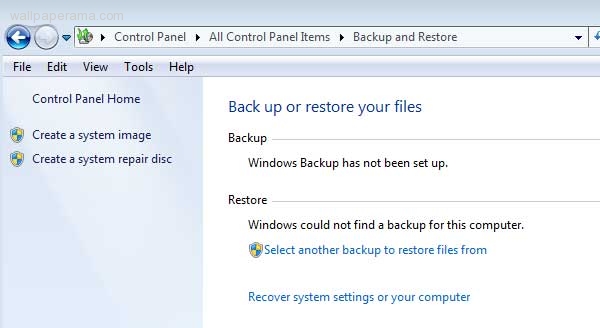
Insert a blank DVD or CD and click Create Disk
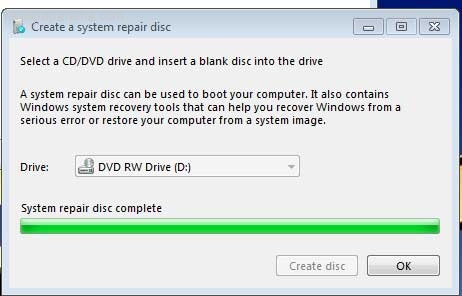
*once the disk is completed, you might get a message:

using the system repair dis
you can use the system repair disk to access system recovery options that can help you recover your computer form a serious error.
please label your disk with the following information:
Repair Disk Windows 7 32-bit
how many times have you found yourself in a bind because your computer crashed. i have windwos 7 ultimate installed on my laptop and it has a feature that you can create a recovery disk. i dont want to go through losing my data because the operating system crashed.
i have had my share of computer crashes, specially with windows. so it a must to prevent disaster from happening to you when you least expect it.
first open the control panel, in the control panel click on Backup and Restore. or you can go to this path: Control Panel\\All Control Panel Items\\Backup and Restore
Insert a blank DVD or CD and click Create Disk
*once the disk is completed, you might get a message:
using the system repair dis
you can use the system repair disk to access system recovery options that can help you recover your computer form a serious error.
please label your disk with the following information:
Repair Disk Windows 7 32-bit